

Shared progress visibility gives coaching teams one thing they cannot build any other way: a common, current picture of where every client stands. That single picture aligns expectations between coach and client, builds the trust that makes hard conversations possible, and turns vague check-ins into measurable momentum.
Two moves get you there fast. First, put every client on one shared record instead of scattered notebooks or personal folders. Second, schedule recurring progress reviews so the record actually gets used, not just updated.
- Adopt a single shared client record accessible to everyone who touches that client’s work
- Put a recurring progress review on the calendar, not just an open invitation to “check in anytime”
Platforms built for this, including ClickCoach, exist specifically to hold goals, notes, and action plans in one place so a team doesn’t have to rebuild that picture from memory every session.
Key Takeaways
Shared progress visibility works because it replaces memory and assumption with a record every coach on the team can see, act on, and trust.
| Point | Details |
|---|---|
| Visibility drives renewals | Clients who see stepwise progress toward goals renew more readily than those relying on verbal reassurance. |
| Trust depends on goal type | Extrinsic goals need transactional trust through visible metrics; intrinsic goals need transformational trust plus confidentiality. |
| Roles need defined access | Primary coaches, co-coaches, backups, and sponsor liaisons each need different levels of record access by default. |
| Pilot before you scale | Test one template with a small client cohort for six weeks before rolling visibility systems out practice-wide. |
| ClickCoach centralizes the system | ClickCoach combines shared client records, action plans, and progress dashboards in one workspace built for multi-coach teams. |
Table of Contents
- Why Shared Progress Visibility Matters for Trust and Retention
- What Roles Does Visibility Play in a Multi-Coach Team?
- How Do You Build a System for Shared Progress Visibility?
- What Metrics Should Coaching Teams Track and How Often?
- What Templates Make Progress Visibility Easy to Start?
- How ClickCoach Supports Shared Progress Visibility
- What Usually Goes Wrong When Teams Try This?
- How Should Teams Communicate Around Shared Progress Data?
- What Are the Privacy and Ethics Rules for Shared Client Data?
- A Coach-Owner’s View on Making Visibility Actually Stick
- Try ClickCoach for Your Team’s Progress Visibility
- Sources
- FAQ
Why Shared Progress Visibility Matters for Trust and Retention
Clients renew when they can see they’re actually getting somewhere. Research on the progress principle and related studies referenced by Quick Blaster links visible, tracked progress to higher goal attainment and stronger engagement, because clients stop relying on fuzzy memory and start seeing stepwise movement.
That visibility does double duty on trust. A grounded theory study on trust formation in workplace coaching found trust isn’t one thing. Visible progress builds transactional trust when goals are extrinsic, things like a promotion timeline or a sales target, because the client can verify the coach is delivering. But for intrinsic goals, confidence, identity, leadership presence, visibility only unlocks deeper transformational trust when confidentiality and the relationship itself are handled carefully.
Why this matters for renewals: A leadership client who can point to a dashboard showing some behavioral goals met is far more likely to sign on for another quarter than one asked to “trust the process.” A team coaching a mid-level manager through a rocky reorg saw renewal conversations shift entirely once session notes and action items lived in one visible thread instead of each coach’s private files.
- Track goal completion visibly, not just verbally
- Separate extrinsic wins (visible, shareable) from intrinsic ones (visible, but handled with more care)
- Use visible momentum, not persuasion, to drive renewal conversations
What Roles Does Visibility Play in a Multi-Coach Team?
Once a practice grows past a solo operator, visibility stops being a nice-to-have and becomes the thing that prevents dropped handoffs. Multi-coach teams need defined roles, not just shared access.
- Primary coach: owns the client relationship, edits goals and session notes, sets the action plan
- Co-coach: reads full history before a session, can add notes, cannot alter the primary’s goal framework without discussion
- Backup coach: needs read access to the last three sessions and current action plan only, enough to run a session without derailing continuity
- Sponsor liaison: sees a redacted summary (goals, progress percentage, no session-note detail) for reporting to an employer or referring manager
- Client owner (practice lead): sees everything, for quality control and risk flagging
Risk flags, anything signaling burnout, disengagement, or a stalled goal, should be visible to every role above backup coach by default. Session note detail should not be visible to sponsors under any default setting.
Pro Tip: Before opening any client record to a co-coach or sponsor, ask the client directly. A quick “I’d like [name] to have visibility into your goals so we can coordinate coverage, is that alright?” takes ten seconds and prevents a much longer trust repair later.
The grounded theory research on coaching trust is blunt about this: undisclosed sharing with sponsors damages trust fast, even when the coach’s intentions were good.
How Do You Build a System for Shared Progress Visibility?
You don’t need custom software to start, but you do need a defined set of features and a sequence, not a scramble.
Required system features:
- One client record per person, not one per coach
- A shared goals list visible to everyone with access
- An action-plan tracker with owners and due dates
- Standardized session-note templates so entries are comparable across coaches
- Homework and follow-up tracking tied to the same record
- Internal messaging attached to the client file, not a separate email thread
- Permission controls matching the roles above
- A dashboard view showing trend, not just the latest data point
A client portal built around these features reduces the administrative friction that MemberMouse notes that it becomes unmanageable once a practice grows past a handful of clients on manual systems.
Operational practices to pair with the system:
- Standardize session notes to one template, no exceptions
- Build a shared review agenda used at every team sync
- Set a fixed cadence for team syncs, weekly for active caseloads
- Define an escalation path in writing for risk flags, so nobody has to guess who to tell
Implementation sequence for a pilot:
Choose a platform, build your session-note and action-plan templates, migrate five to ten sample client records, train the team on the permission model, then run a six-week pilot before rolling out practice-wide.
| Point | Details |
|---|---|
| Start with one record type | Migrate a small cohort first to surface permission and template gaps early. |
| Fix the template before scaling | A standardized session-note format is what makes multi-coach notes usable at all. |
| Set the sync cadence up front | Weekly syncs for active caseloads keep the shared record from going stale. |
What Metrics Should Coaching Teams Track and How Often?
Track fewer numbers, watched consistently, rather than a dozen metrics nobody reviews. CoachingPortal’s guidance on structuring check-in data recommends building dashboards around trends instead of single-point measurements, because a coach reacting to one bad week without context usually reacts wrong.
Core KPIs worth tracking on every client record:
- Goal completion rate against the stated action plan
- Homework or between-session task completion
- Client self-assessment score, on whatever scale your intake process uses
- Engagement indicators: session attendance, response time to check-ins
- Retention risk flags, raised manually or by pattern
| Cadence | What to review |
|---|---|
| Every session | Quick micro-check: was homework completed, any new risk signals |
| Monthly | Trend review across the KPIs above, not just the latest entry |
| Quarterly | Full outcomes review against the original goal statement |
Trend views turn an “off week” into data rather than a mystery. Instead of guessing why a client seems disengaged, a coach can look at three months of self-assessment scores and see whether this is a blip or a pattern, which is exactly the kind of contextualized data CoachingPortal argues improves both the conversation and the retention outcome.
What Templates Make Progress Visibility Easy to Start?
You can build these into a spreadsheet this week or drop them into a client portal if you already have one.
Action-plan template fields:
- Goal statement (specific, one sentence)
- Success criteria (how you’ll both know it’s done)
- Steps to get there, broken into two to four concrete actions
- Owner of each step (client or coach)
- Due date per step
- Evidence of completion (a document, a metric, a client statement logged verbatim)
Progress review checklist, session level:
- Was last session’s homework completed?
- Any new risk flags to log?
- Does the action plan need a step added or revised?
Progress review checklist, monthly:
- Pull the trend view: is the self-assessment score moving, flat, or dropping?
- Compare goal completion rate against the original timeline
- Flag any client showing two consecutive disengagement signals
A simple permission matrix keeps this from becoming a free-for-all:
How ClickCoach Supports Shared Progress Visibility
ClickCoach maps directly onto the system described above rather than requiring a coach to stitch one together from separate tools. It combines a single client record, branded client portals, action-plan tracking, and progress dashboards in one workspace, distinct from a coaching directory, a certification program, or a marketing platform, none of which handle session-level record keeping.
What matches the recommended system:
- Shared client records with role-based permissions for multi-coach teams
- Progress dashboards built around trend views, not just single data points
- Action plans and homework tracking tied to the same client file
- AI-assisted drafting for homework and follow-up actions, with the coach reviewing and approving before anything reaches the client
Pro Tip: For a first-month pilot, don’t migrate your whole caseload. Move five active clients, build one session-note template, and turn on the dashboard for that group only. It surfaces permission and workflow questions while the stakes are still low.
What Usually Goes Wrong When Teams Try This?
The most common failure isn’t technical, it’s behavioral. A team adopts a shared record, uses it faithfully for three weeks, then quietly drifts back to private notes because the shared template felt slower than typing a quick personal memo.

The fix: make the shared template genuinely faster than the alternative, not just more thorough. If your session-note template has fourteen fields, coaches will abandon it. Six fields, filled in ninety seconds, survives contact with a busy caseload.
A second pitfall: inconsistent entry habits across coaches. One coach logs detailed notes, another jots two words, and the “shared” record becomes useless for anyone doing a handoff. Fixing this requires a written standard, not a suggestion, spell out exactly what belongs in each field and audit a sample monthly during your team sync.
A third issue shows up with sponsor-facing visibility: teams either overshare, sending full session notes to an employer, or undershare so much the sponsor stops trusting the process at all. Neither works. The fix is a fixed redaction template, decided once and applied every time, not judgment calls made case by case under deadline pressure.
Finally, teams often skip the pilot phase entirely and roll a new system out to every client at once. That’s how gaps in templates and permissions get discovered in front of clients rather than in a low-stakes test. A small pilot cohort before a full rollout catches most of these problems while the cost of a mistake is still low.
How Should Teams Communicate Around Shared Progress Data?
Visibility without a communication protocol just creates more noise. The goal is putting the right conversation next to the right data, not flooding every coach with every update.
Keep messaging attached to the record, not in a separate inbox. When a question about a client’s progress lives three email threads away from the actual data, coaches end up answering from memory instead of from the file in front of them. Attaching internal notes and questions directly to the client record, the way CoachingPortal recommends structuring check-in data, keeps context and conversation in the same place.
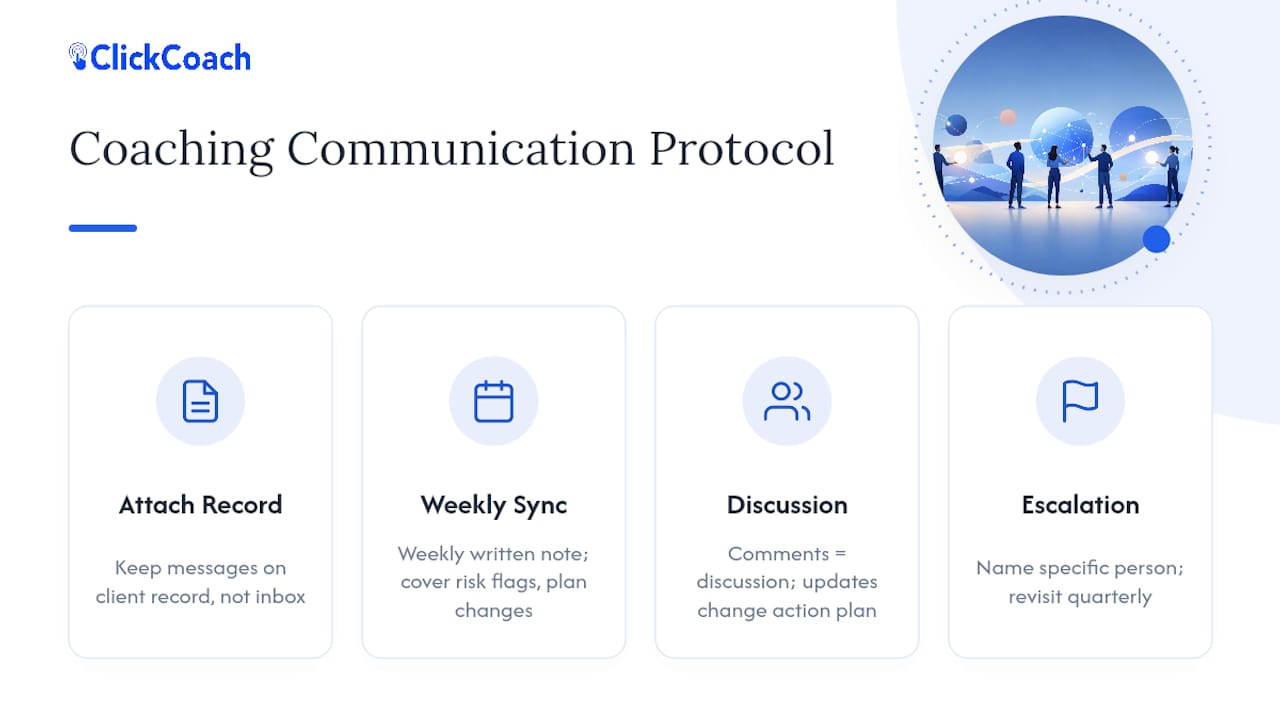
Set a default communication rhythm, then stick to it. A weekly written sync note, even five sentences, covering active risk flags and any plan changes, beats an ad hoc “let me know if anything comes up” policy. Ad hoc policies mean urgent items get missed and minor ones get over-escalated.
Separate discussion from decision. A comment thread on a client record is for discussion. The action plan itself should only change through a defined update, not a buried comment nobody circles back to confirm. Otherwise two coaches can walk away from the same thread with different understandings of what was agreed.
Escalation needs a name attached to it, not a policy. “Escalate risk flags to the client owner” is meaningless if nobody knows who currently holds that role this quarter. Name the specific person, and revisit that assignment at least once a quarter as caseloads shift.
What Are the Privacy and Ethics Rules for Shared Client Data?
Shared visibility inside a team is not the same thing as shared visibility with anyone who asks, and the two get confused often enough to cause real damage.
Get explicit consent before opening a record to anyone beyond the primary coach. This applies to co-coaches, backups, and especially sponsors. The grounded theory research on coaching trust is specific on this point: sharing progress information with a sponsor without the client’s knowledge damages trust even when the coach believed the disclosure was harmless or routine.
Distinguish what a sponsor needs from what a co-coach needs. A sponsor typically needs a goal-completion percentage for reporting purposes. A co-coach covering a session needs actual session-note context to do the job well. Collapsing those two into one access level, either overexposing the sponsor or underequipping the co-coach, is one of the most common privacy mistakes in team practices.
Contract for this in writing before the first session, not after a problem surfaces. Spell out, in the client agreement, exactly who on the team can see what, and under what circumstances a sponsor summary gets generated. Verbal assurances don’t hold up when a client later asks who has seen their file.
Redact by default, not by exception. Session notes containing anything personal, health information, family details, unrelated disclosures, should never appear in a sponsor-facing summary automatically. Build the redaction into the template itself so it doesn’t rely on a coach remembering to strip it out under deadline pressure.
A Coach-Owner’s View on Making Visibility Actually Stick
The teams that make shared visibility work aren’t the ones with the fanciest dashboard. They’re the ones where the primary coach models the behavior first, updating the shared record before asking anyone else to.
Co-coaches resist new systems when they feel imposed. Frame it instead as protecting the client, not policing the team, and resistance tends to soften. On consent, don’t bury it in an intake form. Ask the client directly, in plain language, before any second coach gets access.
Start with one pilot client group. Watch where the template breaks before you scale it.
— Mitch Russo
Try ClickCoach for Your Team’s Progress Visibility
If your team is still piecing together shared visibility from a mix of spreadsheets, personal notebooks, and separate email threads, ClickCoach gives you the shared client record, action-plan tracker, and progress dashboard in one place instead of three.

A practical way to start: set up one shared client record template, one action-plan format, and a basic KPI dashboard for a small pilot group, five to ten clients, run it for thirty days, and see where your current handoff gaps actually show up. ClickCoach’s coaching business management software is built to hold that pilot without forcing your team to juggle separate apps for notes, plans, and billing. If you’re weighing the cost against your current patchwork of tools, the pricing page lays out what full platform access actually includes.
Sources
- The Role of Goal Content in the Formation and Function of Trust in Workplace Coaching
- How Visible Goal Progress Keeps Coaching Clients Engaged and Renewing - Quick Blaster
- What Is a Client Portal (And Does Your Coaching Business Need One)? | MemberMouse
- What a Coaching Portal Should Do for Your Business | CoachingPortal Blog
FAQ
What Does Shared Progress Visibility Mean for a Coaching Team?
It means every coach with legitimate access can see a client’s current goals, session notes, and action-plan status in one place instead of relying on separate personal notes.
How Often Should a Coaching Team Review Client Progress?
Do a quick check at every session, a full trend review monthly, and a complete outcomes review each quarter against the original goal statement.
Do Clients Need to Consent Before a Co-Coach Sees Their Record?
Yes. Ask the client directly before opening their file to a co-coach, backup, or sponsor, since undisclosed sharing has been shown to damage client trust.
What Should a Sponsor See That a Co-Coach Doesn’t?
A sponsor typically gets a goal-completion percentage or summary, while a co-coach needs full session-note context to run a session competently.
Can ClickCoach Handle Multi-Coach Permission Needs?
ClickCoach supports role-based access across shared client records, action plans, and dashboards, letting multi-coach practices coordinate without exposing full session detail to every role.