

Yes. A coaching practice-management platform can meet HIPAA obligations for coaching workflows when the vendor signs a Business Associate Agreement and backs it up with encryption, access controls, and audit logs. The immediate action: request a signed BAA from any vendor you’re evaluating, including ClickCoach, and confirm encryption and audit logging in writing. If a vendor won’t sign or can’t document those controls, don’t put protected health information anywhere near their platform.
TL;DR:
- Most coaching practice-management platforms can meet HIPAA requirements if they sign a BAA and implement encryption, access controls, and audit logs, which must be confirmed in writing before use.
- Not all client data is PHI; only health-related notes or assessments require a BAA, so choose platforms that handle coaching workflows and sign BAAs to avoid unnecessary compliance risks.
- Verify technical safeguards such as encryption standards, multi-factor authentication, role-based access, and audit logs through documentation like SOC 2 reports or security whitepapers before committing to a vendor.
- Implement a structured rollout process that includes signing a BAA, configuring role permissions, enabling MFA, and scheduling regular access log reviews to maintain ongoing compliance.
- The cost of compliance features generally lies in mid-tier plans, and vendors should clearly include a BAA, breach notification timelines, and data export options in their contracts without extra charges.
Table of Contents
- What HIPAA Compliant Coaching Software Actually Means
- Essential Security Features To Require From A Coaching Platform
- What Questions Should You Ask A Coaching Software Vendor?
- How Do You Roll Out A Compliant Coaching Platform?
- How Long Should Data Be Retained, And What Happens After A Breach?
- What Should Compliance Cost, And What Belongs In The Contract?
- Does A Coaching Platform Need HITRUST Or SOC 2 To Be Compliant?
- How Long Does It Take To Deploy A Compliant Coaching Platform?
- What Does A Successful Rollout Actually Look Like?
- Can A Compliant Platform Still Connect With Your Other Coaching Tools?
- ClickCoach: What To Ask Before You Commit
- A Coaching Business Owner’s Take On Getting This Right
- Sources
- FAQ
What HIPAA Compliant Coaching Software Actually Means
HIPAA compliant coaching software, in practical terms, refers to practice-management platforms that handle scheduling, session notes, billing, and client portals for coaching businesses, not electronic health record (EHR) or telehealth systems built for clinical care. That distinction matters because the compliance bar shifts depending on which category you’re buying into.
A practice-management system handles the business side of a coaching practice, things like reminders, invoicing, and client records, while an EHR focuses on clinical treatment documentation. Most coaches never need an EHR. HIPAA applies when your business functions as a “covered entity” or “business associate” handling protected health information (PHI), and it requires a signed BAA whenever a vendor stores or processes that data on your behalf.
Here’s the practical implication for your practice: not every piece of client data you collect is PHI. A goal-tracking note or an accountability check-in usually isn’t. But if you’re a wellness coach recording health conditions, medication notes, or anything resembling a clinical assessment, treat that information as PHI and require a BAA before it touches any software. Coaching-focused platforms that sign BAAs and layer on standard security controls, rather than clinical EHRs built for a completely different use case, tend to be the better fit for coaches who need coaching workflows, not medical charting.
Essential Security Features To Require From A Coaching Platform
Before you sign anything, verify the technical and contractual backbone behind a vendor’s compliance claims. Marketing copy that says “HIPAA compliant” means nothing without documentation behind it.
On the technical side, look for:
- Encryption in transit (TLS 1.2 or higher, enforced HTTPS) and encryption at rest (AES-256 or equivalent) for stored client data.
- Multi-factor authentication (MFA) for every user account, not just admins.
- Role-based access controls so front-desk staff can’t see the same records as a lead coach.
- Immutable audit logs that record who accessed what, and when.
- Secure file storage for intake forms, assessments, and session documents.
On the contractual side, confirm the vendor will sign a BAA, spell out breach notification timelines, and cover any subcontractors (subprocessors) who touch your data. Ask what happens to your data if you cancel: can you export it cleanly, or does it disappear?
For client-facing features, a branded secure client portal with in-platform messaging beats plain email every time, since email isn’t encrypted by default and creates a paper trail you don’t control. E-sign contracts and scoped client access, where clients see only their own records, round out the list.
Pro Tip: Ask a vendor for their security whitepaper before the sales call, not after. A vendor that can produce one quickly usually has its compliance house in order; one that stalls usually doesn’t.
What Questions Should You Ask A Coaching Software Vendor?
Vendor due-diligence doesn’t require a law degree. It requires five direct questions and the willingness to walk away from a bad answer.
- Will you sign a BAA? If the answer is “we don’t need one” or “let’s discuss after you subscribe,” that’s a stop sign.
- Can you provide a current security whitepaper or SOC 2 report? Reputable practice-management vendors can produce documentation, even informal, showing encryption standards and access controls.
- Where is data stored, and who are your subprocessors? You want a specific answer, not “the cloud.”
- How long do you retain audit logs? Thirty days is thin. Twelve months or longer gives you real forensic value if something goes wrong.
- What is your breach notification timeline? HIPAA requires notification without unreasonable delay; a vendor should be able to state their internal target.
A vendor that won’t sign a BAA or can’t produce security documentation shouldn’t handle PHI, period. That’s not caution; it’s the baseline expectation the industry has settled on. Before committing, request a BAA template and run a test export of sample data. A clean, complete export tells you whether you’ll actually own your client records if you ever leave.
How Do You Roll Out A Compliant Coaching Platform?
Implementation isn’t a single event. It’s a sequence, and skipping steps is how practices end up with gaps they discover during an audit instead of before one.
- Before signing: Get the BAA executed, confirm encryption and logging in writing, and map out how existing client data will migrate and in what format.
- Initial setup: Turn on MFA for every user, configure role-based permissions by staff function, set client portal visibility rules, and define retention and deletion policies before you load a single client record.
- Ongoing operations: Train staff on what counts as PHI and how to handle it, review access logs on a set schedule, run backup and export tests, and keep a written incident-response plan on hand, not buried in a folder nobody’s opened.
Pro Tip: Set a recurring calendar reminder for your access-log review. Compliance work that isn’t scheduled quietly stops happening after month two.
Configuring a coaching business management system this way at the start saves you from retrofitting security policies onto a practice that’s already live with client data.
How Long Should Data Be Retained, And What Happens After A Breach?
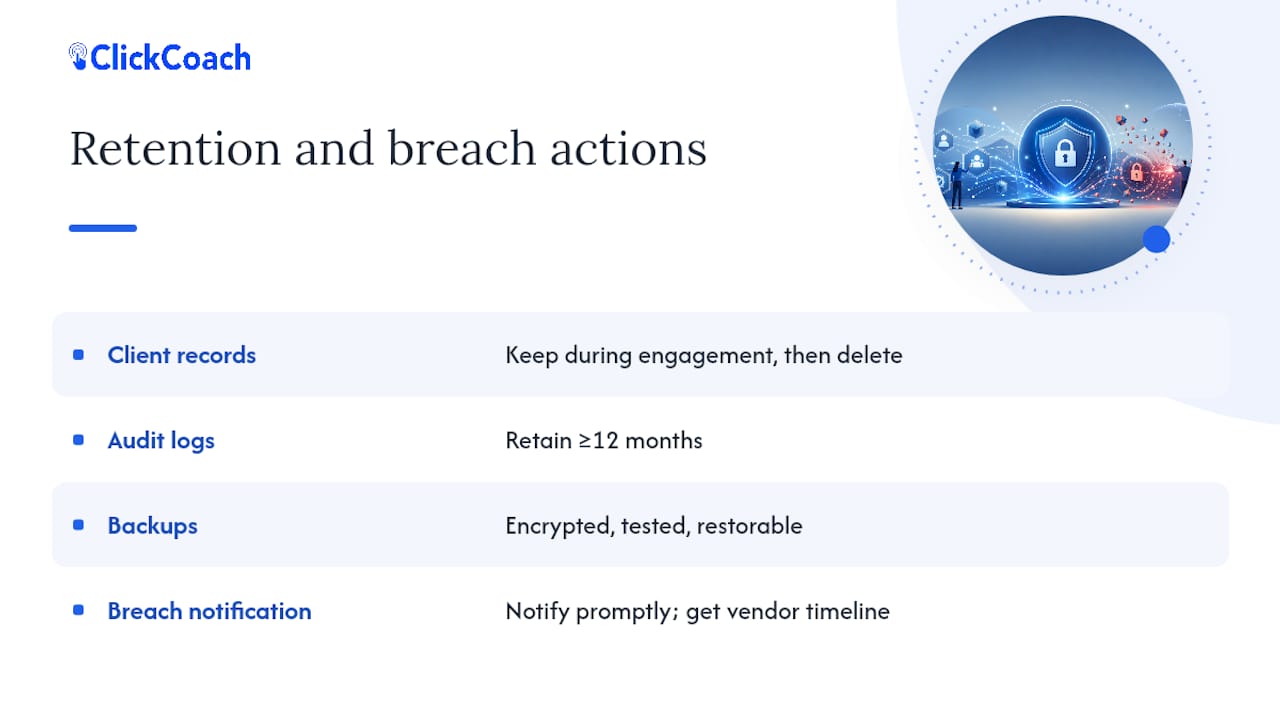
Retention policy is where a lot of coaching practices wing it, and it’s the wrong place to improvise. Decide upfront how long client records, session notes, and audit logs stay in the system, and put that decision in writing rather than letting default settings decide for you.
Most coaching practices don’t need indefinite retention. A reasonable policy keeps active client records for the duration of the engagement plus a defined period afterward, often tied to state record-keeping norms for the coaching relationship, then schedules deletion. Audit logs are different. You want those retained longer, ideally twelve months or more, because they’re your evidence trail if a client disputes access or a security incident needs investigating.
Backups need the same rigor as live data: encrypted, tested periodically, and restorable within a timeframe you’ve actually verified, not just assumed. A backup you’ve never restored from is a hope, not a plan.
Breach notification is the piece coaches most often overlook until it’s too late to plan calmly. HIPAA requires notification without unreasonable delay, and your vendor contract should state their internal timeline for notifying you if they discover an incident, since you’ll need that window to notify your own clients. Ask your vendor directly what that number is and get it in writing. A vague “we’ll let you know quickly” isn’t a policy; it’s a hope dressed up as one.
What Should Compliance Cost, And What Belongs In The Contract?
Compliance obligations change what you should be negotiating, not just what you should be paying. A platform that’s cheaper on paper but won’t sign a BAA or can’t document its security posture isn’t actually cheaper; it’s a liability wearing a lower price tag.
Buyer guides for practice-management platforms generally segment pricing by practice stage: solo practitioners often pay under $30 a month for basic tools, scaling practices land in the $39 to $79 range for more robust feature sets, and enterprise multi-coach operations negotiate custom pricing tied to seat count and support needs. Compliance features, BAA availability, audit logging, role-based access, tend to cluster in the mid-tier and above, since building and maintaining them costs the vendor money too.
When you’re reviewing a contract, look past the subscription fee. Confirm whether the BAA is included at no extra charge or treated as an add-on, since some vendors gate it behind enterprise tiers. Check the termination clause: can you export your data cleanly if you leave, or does the contract make an exit expensive on purpose? And clarify subcontractor coverage. If your vendor uses a third-party payment processor or cloud host, that subprocessor needs to be covered under the same BAA umbrella, not left as a gap you discover during an incident.
Does A Coaching Platform Need HITRUST Or SOC 2 To Be Compliant?
No certification, including HITRUST, is required for HIPAA compliance. That’s a common point of confusion worth clearing up directly: HIPAA is a legal framework, not a certification program, and there’s no official “HIPAA certified” badge any vendor can earn from a government body.
That said, third-party attestations carry real weight as evidence of a security posture, even though they’re not a rubber stamp. Security documentation like a SOC 2 report or a detailed security whitepaper is a practical, commonly accepted artifact vendors provide instead of, or alongside, a HITRUST certification. SOC 2 audits a vendor’s internal controls around security, availability, and confidentiality, and a clean report tells you an independent auditor actually checked the vendor’s claims rather than taking their word for it.
HITRUST is more common among larger healthcare organizations and EHR vendors because it’s a heavier, more expensive certification process, one built for organizations handling PHI at clinical scale. For a coaching practice-management platform, expecting HITRUST is often overkill; expecting a signed BAA, a SOC 2 report or equivalent whitepaper, and demonstrable encryption and logging is the realistic bar. If a vendor leans hard on a HITRUST badge but can’t produce a BAA, that’s backward priorities, not proof of compliance.
How Long Does It Take To Deploy A Compliant Coaching Platform?
Timelines vary by practice size, but a solo coach or small team can typically move from vendor selection to a fully configured, compliant setup in two to four weeks. That window covers contract negotiation and BAA signing (often the slowest part, since legal review on both sides takes time), initial configuration of roles and permissions, data migration from a prior system, and a test run before clients go live in the new portal.
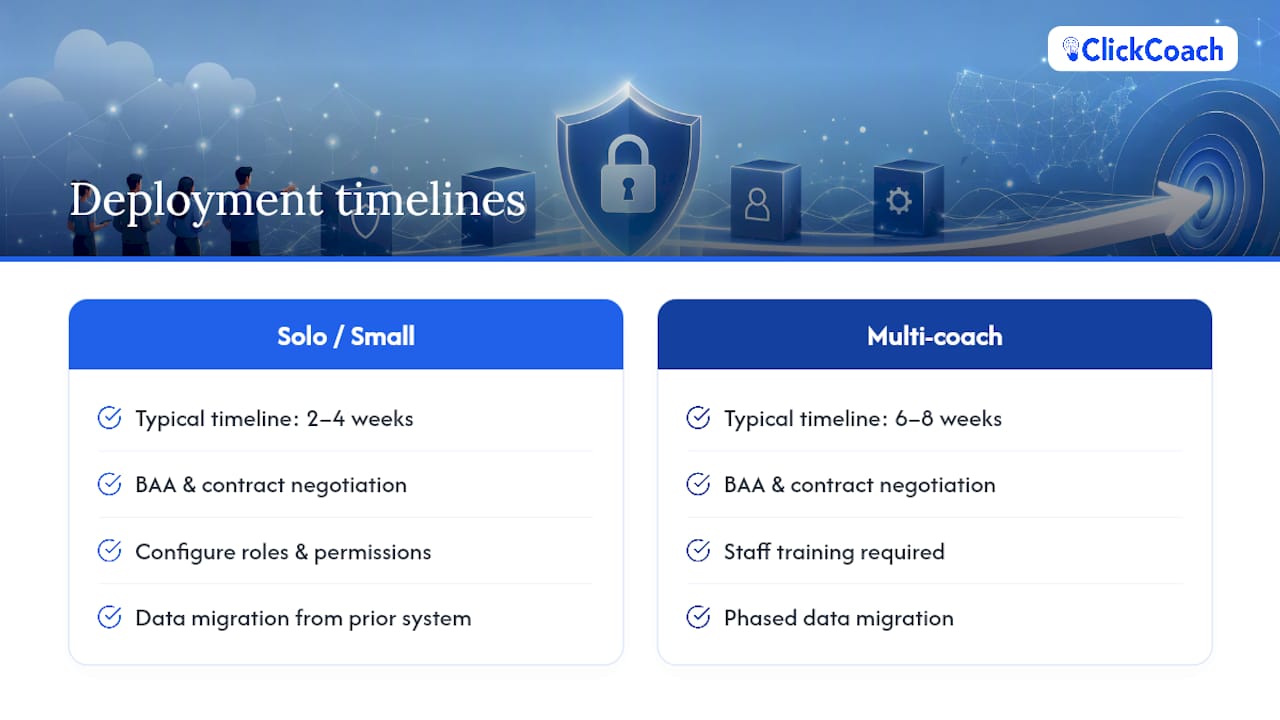
Larger multi-coach practices should budget longer, sometimes six to eight weeks, because staff training, phased data migration, and testing across more user roles add complexity. Rushing this stage is where mistakes happen: a practice that skips the export test or forgets to configure retention rules before loading client records often ends up fixing configuration gaps retroactively, which is harder and riskier than doing it right the first time.
The fastest path isn’t the platform with the most features. It’s the platform whose vendor already has BAA language ready to go and a documented onboarding process, because that shaves weeks off the legal and configuration back-and-forth. Ask during your sales conversation how long onboarding typically takes for a practice your size; a vendor with a real answer has done this before.
What Does A Successful Rollout Actually Look Like?
The pattern among coaching practices that get this right isn’t complicated: they treat compliance as a configuration step, not an afterthought bolted on after a client complaint or a scare.
A solo executive coach handling sensitive workplace mental-health conversations, for example, benefits from setting scoped client access and a signed BAA before the first session is ever logged, so there’s no retroactive scramble to lock down old notes. A wellness coaching practice with three coaches on staff typically sees the clearest win from role-based permissions: the front-desk coordinator books sessions and handles billing without ever seeing clinical-adjacent notes, while each coach sees only their own client roster.
Multi-coach team practices tend to benefit most from centralized audit logging, since it lets a practice owner spot unusual access patterns, like a staff member pulling records for clients outside their caseload, before it becomes a real problem instead of after. The common thread across practices that implement this well: they configure security settings during onboarding, not months into using the platform, and they revisit those settings on a schedule rather than assuming a one-time setup covers them indefinitely.
Can A Compliant Platform Still Connect With Your Other Coaching Tools?
Integration capability doesn’t have to come at the cost of security, but it does require asking the right question before you connect anything: does the integration pass data through an encrypted, logged channel, or does it create a side door around your access controls?
Most coaches run at least a couple of connected tools alongside their core platform, calendar syncing, payment processing, video conferencing for sessions. Solo coaches typically run a lean stack of two to four tools rather than forcing everything into a single all-in-one system, and that’s often the right call when a specialized tool does one job better. The compliance question is whether each connected tool that touches client data also falls under a BAA, either directly or through your primary platform’s subprocessor agreements.
Before connecting a scheduling app, payment processor, or video tool to your coaching platform, ask your primary vendor whether that integration is covered under their existing BAA or whether you need a separate agreement with the third party. A platform with clean API access and documented integration partners makes this easier to verify; one that connects to everything through undocumented workarounds makes it much harder to know where your compliance boundary actually sits. Group and cohort coaching setups add another layer, since group coaching tools often mean more staff touching shared records, which makes role-based permissions even more important to get right before integrating anything new.
ClickCoach: What To Ask Before You Commit
Some coaching practice-management platforms bring client records, session notes, goals, action plans, homework, billing, progress tracking, and branded client portals into one workspace, so you’re not stitching together multiple disconnected tools to run your practice.

If you’re evaluating any coaching practice-management software with compliance in mind, ask for exactly what this article recommends asking any vendor: a signed BAA, a summary of encryption and access-control practices, and a look at how audit logging works inside the platform. A branded client portal and coaching notes software built specifically for coaching workflows, rather than retrofitted from a clinical EHR template, tends to fit the way coaches actually work: goal tracking, homework assignments, and progress notes rather than diagnostic charting.
The best way to know if it’s the right fit is to see it running. Schedule a demo, walk through the role-based permissions and portal settings yourself, and compare what you see against the checklist in this article. If you’re ready to move forward, check current pricing and start the evaluation process directly.
A Coaching Business Owner’s Take On Getting This Right
Small practices overthink certifications and underthink the boring stuff that actually protects clients: a signed BAA, MFA turned on, and permissions set correctly for each staff role. Those three things cover most of the real risk, and they take an afternoon to configure, not a compliance department.
If I had to rank priorities for a solo coach or a three-person team, it’s this: get the BAA signed before you load a single client record, turn on MFA and set role permissions the day you configure the platform, and put a quarterly export-and-access-review on your calendar so it actually happens instead of becoming a someday task. has shown me that practices fail at compliance not from bad intentions but from treating security as a one-time setup instead of a habit. backs up why I push clients toward documented controls over flashy certification badges every time.
— Mitch Russo
Sources
For coaches who want to dig deeper into vendor selection and the practice-management versus EHR distinction, these resources informed the guidance in this article:
- Practice Management vs EHR: Solo Therapist Guide | EasyMindCare
- Online coaching tools: I tested 6 (honest 2026 take)
FAQ
Is Coaching Practice-Management Software The Same As HIPAA-Compliant EHR?
No. Practice-management software handles scheduling, billing, and coaching-specific workflows, while EHR systems are built for clinical treatment documentation; coaches rarely need the latter.
Do I Need A BAA If My Coaching Clients Don’t Discuss Health Conditions?
If your platform never stores or processes protected health information, a BAA isn’t strictly required, but wellness and health-adjacent coaches should request one anyway since client conversations can drift into PHI territory.
What’s The Fastest Way To Verify A Vendor’s Security Claims?
Ask for a signed BAA, a SOC 2 report or security whitepaper, and run a test export of your data; a vendor that can’t produce these quickly is a red flag.
Does ClickCoach Sign A Business Associate Agreement?
Coaches evaluating ClickCoach should request the BAA directly and confirm encryption, access controls, and audit logging details during a demo before onboarding client data.
How Often Should I Review Access Logs Once My Platform Is Live?
A quarterly review is a reasonable minimum for small practices, though multi-coach teams handling sensitive records may benefit from monthly checks.