

Most solo coaches pay a moderate monthly fee once all charges land, and small teams often pay higher monthly totals accordingly. The rule that saves you from a bad surprise: never budget from the listed price alone, always calculate your real monthly cost, including add-on modules, per-client overage charges, and payment-processing fees. Some platforms sell a single annual license instead of a monthly bill, which changes the math but not the discipline required to do it right.
TL;DR:
- Coaches should always calculate their real monthly costs, including add-ons, overage charges, and payment processing, rather than relying on advertised prices.
- Entry-level plans typically cover only basic session management, while essential business features like portals, automation, and analytics often require higher tiers or add-ons.
- Per-client pricing models can become expensive as your practice grows beyond 30 clients, whereas flat-tier plans may be more cost-effective at larger scales.
- Bundled all-in-one platforms can reduce total ownership costs by eliminating multiple subscriptions and manual data reconciliation, saving time worth hundreds of dollars monthly.
- Running side-by-side checks on vendor quotes and considering long-term client experience improvements are key to choosing the most cost-effective coaching software.
Table of Contents
- What Does Coaching Software Cost, Really?
- Why the Sticker Price Often Understates Your Monthly Cost
- What Base Tiers Usually Include (and What They Usually Don’t)
- Real Cost Scenarios: What 10, 25, and 50 Clients Actually Run
- Other Recurring and One-Time Costs Coaches Should Budget For
- How to Evaluate Pricing Pages Without Getting Burned
- How an All-in-One Platform Changes Your Total Cost of Ownership
- Budgeting Advice From the Editor
- Simplify Your Budget With One Predictable Line Item
- Selected Sources and Further Reading
- FAQ
What Does Coaching Software Cost, Really?
The advertised number on a pricing page rarely matches what lands on your card statement three months later. Coaching platform pricing works the way most SaaS pricing works: a low headline figure gets you in the door, then the tools you actually need to run a real practice sit behind upgrade prompts.
That gap between coaching software pricing as advertised and coaching software cost as billed is the entire reason this article exists. If you’re comparing coaching app subscription fees across five vendors, you need to know where each one hides its real cost before you commit a year of client data to it.
Why the Sticker Price Often Understates Your Monthly Cost
“From $19/month” is a marketing device, not a budget number. It reflects the cheapest tier, billed annually, often for a single user with a client cap you’ll blow past within two months of active practice.
Several structural choices push your bill higher than the homepage number:
- Feature gating. Automated reminders, e-sign contracts, or reporting dashboards frequently sit in a “Pro” or “Business” tier that costs 40 to 100% more than the entry plan.
- Per-client pricing. Some platforms charge per active client above a threshold, so growth itself triggers a bigger invoice. Add ten clients past the cap and you might add $20 to $50 a month.
- Tier cliffs. Cross from 25 to 26 clients and you can jump an entire pricing tier rather than paying incrementally, which is a rough way to learn your growth outpaced your plan.
- White-label and branding fees. Removing the vendor’s logo from your client portal, or applying your own domain, is often a separate paid add-on.
- Payment processing. If you collect payments inside the platform, expect a card-processing cut on top of your subscription, typically in the range most processors charge for online transactions.
Pro Tip: Before you trust any advertised price, ask the vendor for a written quote based on your actual client count and the specific modules you’d use in month one. If they can’t produce one in writing, treat the headline price as fiction until proven otherwise.
Billing cadence matters too. Annual plans usually offer a discount compared to monthly billing, but they lock you into a full year before you know whether the platform fits how you actually coach.
What Base Tiers Usually Include (and What They Usually Don’t)
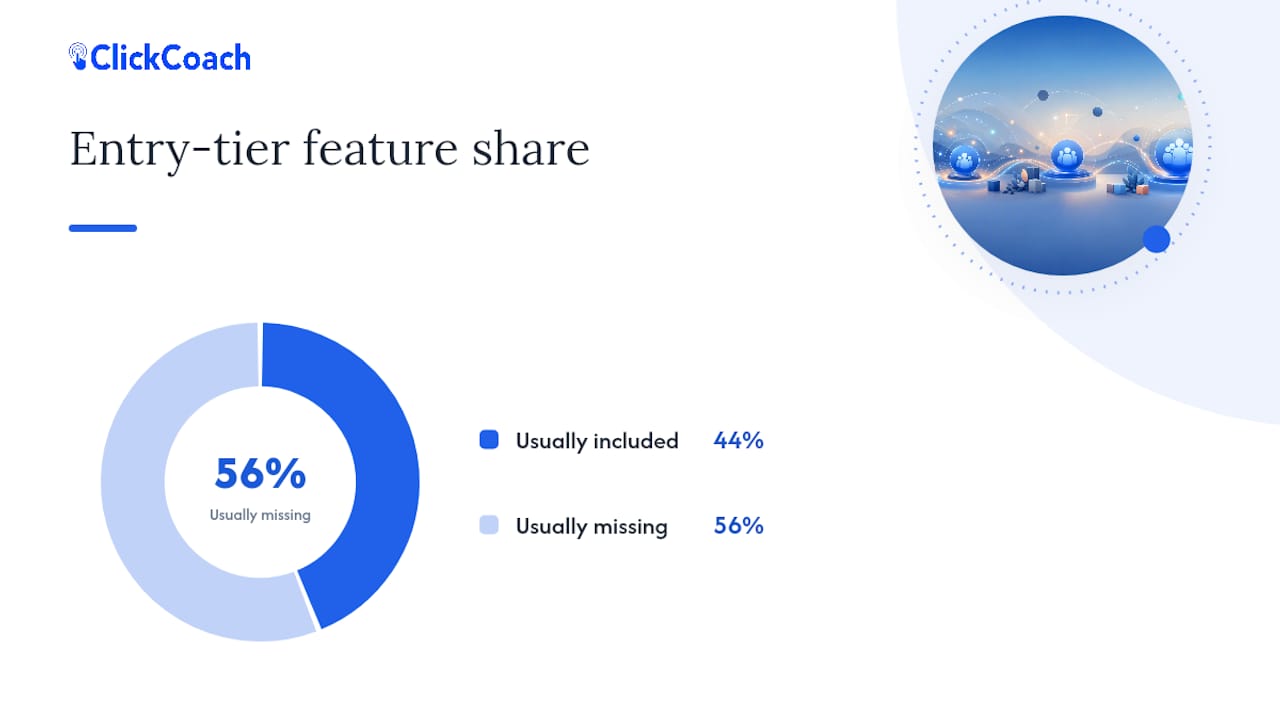
Entry-level plans across the coaching software category tend to cover the basics of running sessions, not the basics of running a business. Knowing the difference before you sign up saves you from a mid-year upgrade you didn’t budget for.
Base tiers commonly include:
- A booking or scheduling calendar
- Simple client profiles and contact records
- Session notes, sometimes with limited storage
- Basic one-off payment collection
What’s usually missing at the entry level:
- Recurring or subscription billing for retainer clients
- Branded client portals clients log into between sessions
- Course or curriculum delivery for group programs
- Automated workflows, reminders, or homework assignment
- Analytics or progress-tracking dashboards beyond raw notes
The practical move is to separate what you need on day one from what you’ll need at 25 or 50 clients. A brand-new solo coach can often survive on scheduling and notes for a few months. A coach running cohort programs or accountability-heavy engagements needs a client portal and progress tracking from the start, because retrofitting that experience onto clients who already learned your old process creates friction you’ll pay for in cancellations, not software fees.
Real Cost Scenarios: What 10, 25, and 50 Clients Actually Run
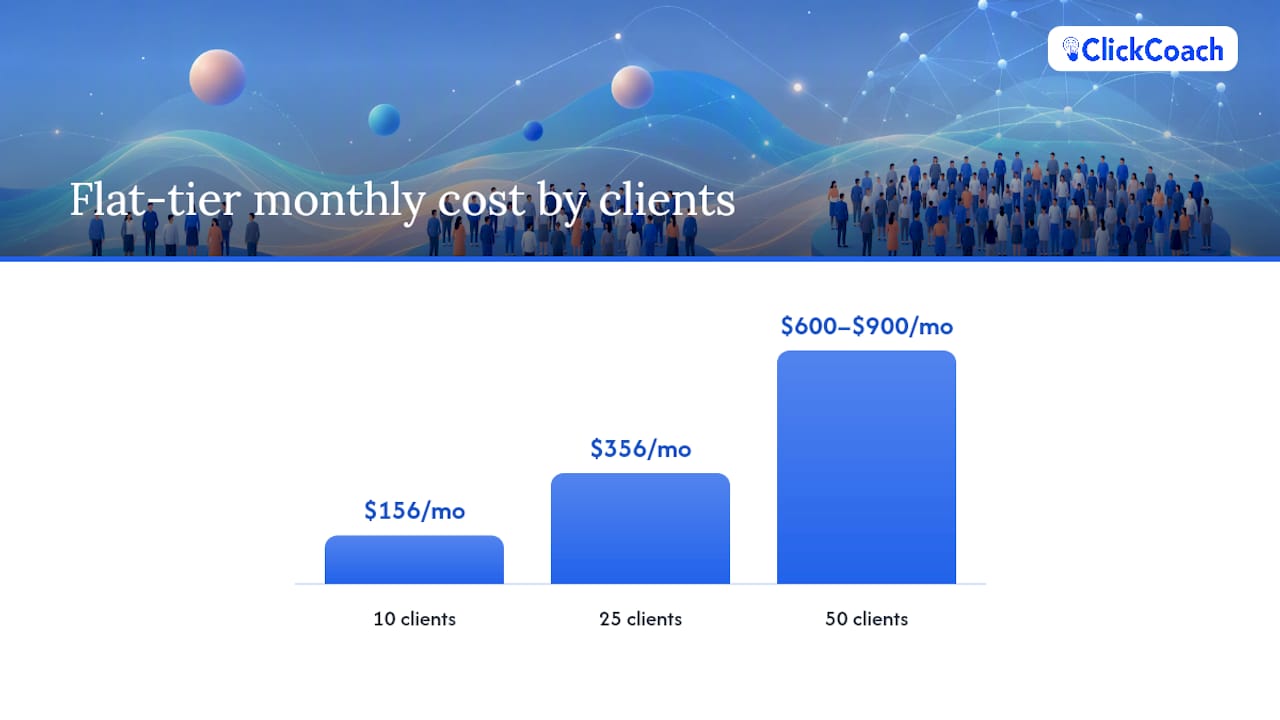
Numbers only mean something when you can run them yourself. Here’s the math using three common pricing structures you’ll encounter while shopping: a flat monthly subscription, a per-client add-on model, and a flat annual license.
Assumptions: payment processing runs roughly 2.9% + $0.30 per transaction, a common range among processors; per-client models typically charge $1 to $3 per active client above a base allotment; add-on modules (portals, automation, billing) average $10 to $40 a month combined when unbundled.
- 10 active clients. A flat-tier platform at $49/month plus one add-on module ($20/month) plus processing on, say, $3,000 in monthly client payments (about $87 in fees) lands near $156/month. A per-client model with a $29 base and $2/client over a 5-client allotment adds only $10, landing closer to $126/month before processing.
- 25 active clients. The same flat platform likely forces an upgrade to a $99 mid-tier to unlock the client cap, plus two add-ons now needed for reporting and portals ($40/month), plus processing on roughly $7,500 collected (about $217). Total: around $356/month. The per-client model at $2 per client over the allotment now adds $40 to its base, landing near $166/month before processing.
- 50 active clients. Flat-tier vendors often push you into a top “Business” plan, commonly $150 to $250/month, plus add-ons that may now be bundled in but priced higher overall, plus processing on roughly $15,000 collected (about $435). Realistic total: $600 to $900/month. The per-client model, if it scales linearly, can now exceed the flat-tier cost, since $2 per client over a small allotment on 50 clients adds up fast.
The sensitivity worth watching: per-client pricing looks cheap at low volume and expensive at scale, while flat-tier pricing does the opposite. A single fee structure decision can flip which model saves you money once you cross 30 or 40 clients.
Other Recurring and One-Time Costs Coaches Should Budget For
The subscription line is rarely the whole bill. Several costs show up once, or recur quietly outside the main invoice, and they belong in your budget from the start.
- Onboarding and setup fees. Some vendors charge a one-time implementation fee, particularly for multi-coach accounts or white-label builds.
- Data migration. Moving client records, notes, and templates from spreadsheets or a previous platform sometimes carries a service fee if you want it done for you rather than doing it yourself.
- Branding and white-label costs. Custom domains, removed vendor branding, and styled client portals often sit outside the base subscription.
- Training time. Even intuitive software costs you hours, and your hours have a dollar value. Block realistic ramp-up time, not the vendor’s optimistic estimate.
- Third-party integrations. Calendar sync, video conferencing, email marketing, and e-signature tools you keep running alongside your coaching platform each carry their own subscription, unless your platform includes them natively.
Add these up before comparing two vendors on subscription price alone. A cheaper base plan that requires four separate integrations can cost more monthly than a pricier all-in-one option once every recurring third-party fee is counted.
How to Evaluate Pricing Pages Without Getting Burned
A pricing page is a sales document, not a budget tool. Before you commit a card number, run through this checklist during any free trial:
- Confirm the client-count rule. Ask exactly what happens at your 11th, 26th, or 51st client, in writing, not from a sales call.
- List every add-on you’d actually use. Get a per-module price for portals, automation, billing, and reporting rather than assuming they’re bundled.
- Request a sample invoice for your roster. A vendor who can produce one for your specific client count and feature list is being straight with you.
- Test the export function during your trial. Try exporting your client list and notes before you need to, so you’re not locked in by data you can’t retrieve.
- Read the cancellation terms. Note whether you’re on a monthly, annual, or multi-year commitment, and what happens to your data if you cancel mid-term.
- Confirm payment-processing rates and refund policy. These sit outside the subscription price but directly affect your real monthly cost.
Pro Tip: Run the checklist against two vendors in parallel, using the same client count and feature list for both. Side-by-side written estimates expose padding that a single sales call never will.
How an All-in-One Platform Changes Your Total Cost of Ownership
Stacking five separate tools, a scheduler, a notes app, a payment processor, an email tool, and a portal, means paying five subscriptions and reconciling five sets of client data by hand. That reconciliation time is real cost even when no invoice says so.
An all-in-one platform is built to remove that sprawl. ClickCoach combines client records, session notes, progress tracking, billing, and a branded client portal into one workspace, which typically eliminates:
- Multiple monthly subscriptions billed separately
- Manual copying of client data between apps
- Reconciling payment records against a separate CRM
- Rebuilding client-facing branding in three different tools
To measure whether that trade-off is worth it for your practice, estimate your current administrative hours per week across every disconnected tool, then multiply by what your coaching hour is worth. Saving even three hours a week at a $100 hourly rate is $1,200 a month in recovered capacity, which changes how you should weigh a bundled annual license against a cheaper collection of point tools. Full details sit on the ClickCoach pricing page.
Budgeting Advice From the Editor
The trade-off all coach faces isn’t cheap versus expensive. It’s simplicity versus assembly. A lower sticker price on three separate tools can cost you more in reconciliation time than a single higher-priced platform, and that time cost never shows up on an invoice, only in your calendar.
Weigh client experience heavily. A portal your clients actually open between sessions drives renewals in a way that saved subscription dollars never will. Treat coaching software as a business investment with a return, not a line-item expense to minimize. The right question isn’t “what’s the cheapest option,” it’s “what does this cost me once every client stays a year longer.”
— Mitch Russo
Simplify Your Budget With One Predictable Line Item
An all-in-one platform can replace a stack of separate subscriptions with one login covering client records, session notes, billing, and a branded client portal, so your monthly cost math stops depending on multiple vendors’ fee schedules.

Instead of stitching together a scheduler, a notes app, and a payment tool, and tallying what each one actually costs once add-ons and processing fees land, you get one annual license: $497 per year per coach for the Solo coach plan, and the same $497 per year per coach structure for a Multi-coach company, both detailed on the ClickCoach pricing page. Run the checklist from this article against that page yourself: check the client-count rules, confirm what’s bundled versus what costs extra, and compare the total against whatever stack you’re running today. If the math works for your roster, you can explore the features included at every tier and start comparing your real numbers directly on the ClickCoach pricing page.
Selected Sources and Further Reading
The pricing scenarios and feature comparisons in this article draw on ClickCoach’s own published pages. The pricing page confirms current plan structure and cost. The features page details what’s included across the platform. The coaching business management overview explains how the bundled workflow fits together, and the client portal page covers the client-facing experience referenced in the cost scenarios above.
FAQ
How Much Do Coaching Programs Typically Cost?
Coaching program fees for clients vary widely by niche and coach experience, often ranging from a few hundred to several thousand dollars per engagement. That’s separate from coaching software cost, which is what you pay to run your practice, not what you charge clients.
What Is the 70/30 Rule in Coaching?
Definitions of such ratio-based rules vary by coaching methodology, and there’s no single industry-wide standard version worth stating as fact. If you’ve heard it applied to session structure or client talk time, check the specific framework your training program uses rather than assuming a universal definition.
What Is the Best Coaching Software?
The best coaching platform depends on whether you need a bundled system or a handful of specialized point tools. Coaches who want client records, notes, billing, and a branded portal under one login often prefer an all-in-one option like ClickCoach, priced at $497 per year per coach for both Solo and Multi-coach company plans.
Is Coaching App Subscription Software Worth the Money?
It’s worth it when the hours it saves you exceed what you’d otherwise spend reconciling separate tools or chasing client paperwork manually. Calculate your current administrative hours per week, multiply by your hourly rate, and compare that recovered value against the subscription cost before deciding.