

For most coaches, the best coaching scheduler is not a scheduler at all. It’s a practice management platform that ties booking to client records, session notes, and progress tracking, so a calendar slot never floats free of the work happening around it. A standalone scheduler still makes sense if you only run one type of appointment, like a free discovery call with no follow-up system. Success looks like less time on admin, more booked calls that show up, and clients who arrive prepared.
TL;DR:
- Practices with multiple service types should prioritize all-in-one management platforms that integrate client records, billing, and scheduling to reduce administrative hours.
- Features like intake form fields, automated reminders, and automatic payment handling are essential for a smooth coaching workflow and client retention.
- Mapping specific booking needs and testing full end-to-end flows are critical to prevent migration issues and ensure the chosen system supports your practice effectively.
- Disconnected systems for intake, homework, and payments create friction and risk losing historical data, making integration a must-have in scheduling tools.
- For multi-coach teams, platforms supporting permission controls, round-robin assignment, and reporting are better suited than standalone calendar apps.
Table of Contents
- Why an All-In-One Coaching Practice Manager Beats a Standalone Scheduler
- Feature Checklist: The Scheduling Features Coaches Must Compare
- How to Evaluate Scheduling Solutions for Your Coaching Practice
- Setup Checklist and Templates for Coaching Sessions and Packages
- Why ClickCoach Is Built for Scheduling Plus Practice Management
- A Candid Recommendation and the Mistakes Coaches Keep Making
- Getting Started With ClickCoach
- Sources
- FAQ
Why an All-In-One Coaching Practice Manager Beats a Standalone Scheduler
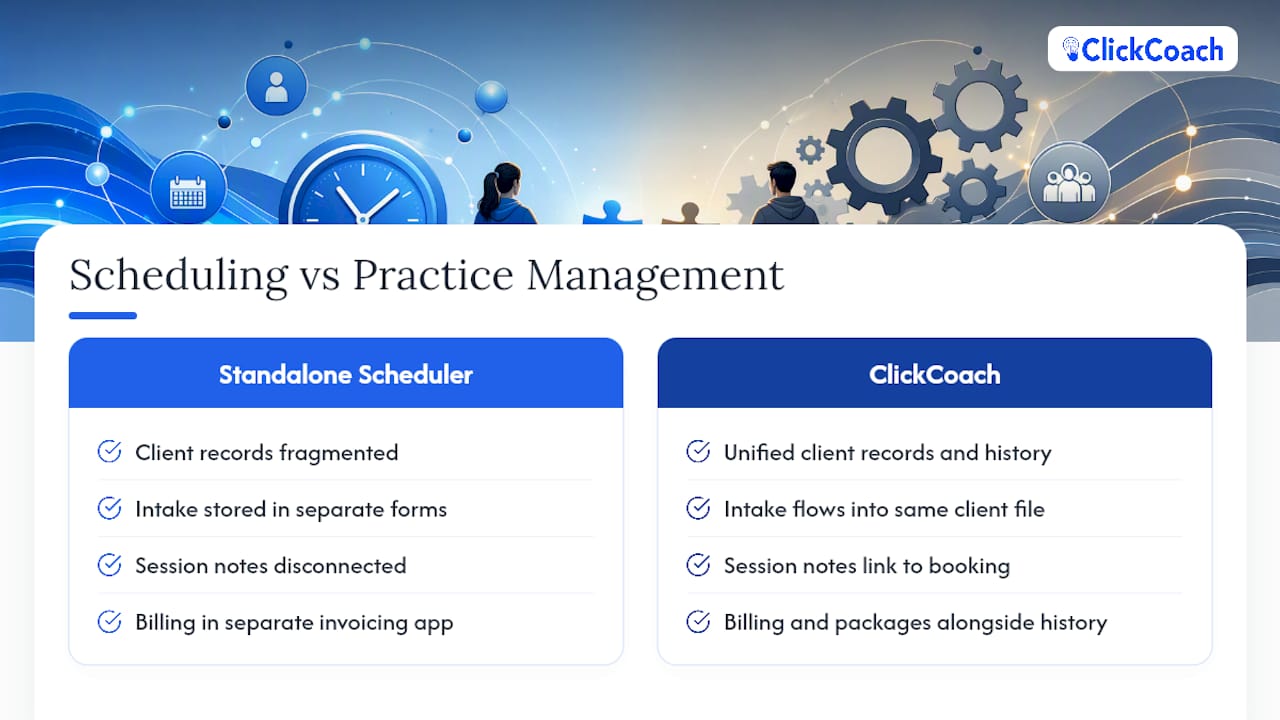
A calendar app answers one question: when is this person free? Coaching needs an answer to a harder question: what does this person need from the next session, and what happened in the last one? A standalone scheduler can’t touch that second question, because it has no idea who the client is beyond a name and an email address.
This gap shows up constantly in real coaching practices. A client books a session through a generic scheduling link, fills out an intake form that lives in a separate form tool, and the coach walks into the call having to hunt across three apps to remember what was assigned last time. Multiply that by twenty clients and the admin load stops being an inconvenience and starts eating hours every week.
Buyer research on coaching software backs this up directly. A category comparison of coaching management platforms found that buyers consistently prioritize program delivery, client records, and admin automation over scheduling in isolation, and that the platforms coaches rate the highest combine all three. The same research points to a common failure pattern: many coaches run one tool for booking and a completely separate one for program content, and that split creates the exact friction an all-in-one system is built to remove.
Here’s where a disconnected scheduling setup typically breaks down:
- Intake answers get collected in a form tool that never syncs to the client’s file, so the coach re-asks the same questions every quarter.
- Homework and action items live in a shared doc or a spreadsheet, disconnected from the calendar that triggered them.
- Payment records sit in a separate invoicing tool, making it hard to see which clients are current and which have lapsed.
- No single view shows session history, so a substitute coach or team member starts from zero.
- Cancellation and reschedule patterns go untracked, hiding early warning signs of a client disengaging.
There’s a real exception here worth naming. If you only offer one thing, say a 30-minute discovery call with no ongoing program behind it, a lightweight standalone scheduler is genuinely fine. You don’t need client records for a call that doesn’t repeat. The moment you start running packages, recurring sessions, or group cohorts, that math flips.
Pro Tip: Before comparing tools, count how many separate apps currently touch a single client’s journey from booking to homework completion. If the number is three or more, that’s your admin tax, and it’s the number an all-in-one platform is designed to shrink.
Feature Checklist: The Scheduling Features Coaches Must Compare
Not every scheduling feature carries equal weight for a coaching practice. Some are non-negotiable, some matter only for certain business models, and a few are nice polish that rarely decide a purchase. Here’s the priority order worth working through when you compare scheduling software for coaches.
- Intake form fields. At minimum, collect the client’s current goal, the biggest blocker they’re facing, and explicit consent for how their data will be used and stored. Skipping consent language is not just sloppy, it can create real privacy exposure depending on your jurisdiction and niche.
- Payments and package handling at booking. Look for support for single-session payments, multi-session packages sold as credits, and recurring subscriptions, along with automatic receipts and a clear, stated refund policy the client sees before they pay.
- Calendar sync and time zone handling. Two-way sync with the calendar you actually use daily, automatic time zone detection for the client’s location, and configurable buffers between sessions so back-to-back bookings don’t leave you scrambling for notes.
- Automated reminders. Email and text reminders sent at more than one interval (24 hours and 1 hour before, for example) measurably cut no-shows, and confirmation messages that let a client reschedule without a phone call save both sides time.
- Group and cohort booking. If you run group programs, the tool needs to handle a single calendar slot with multiple attendees, waitlists, and package deductions that track correctly across a cohort rather than one client at a time.
- Team and permission scheduling. Multi-coach practices need round-robin assignment, visibility controls so one coach can’t see another’s private notes, and an admin view that rolls up bookings across the whole team.
- Booking-page trust elements. A professional photo, a short bio, clear session pricing, and a plain-language cancellation policy on the booking page reduce the hesitation that causes an otherwise interested prospect to abandon the form.
Marketplace review patterns back up several of these priorities. Aggregated feedback on G2 repeatedly surfaces the same functional themes coaches complain about or praise: intake friction, payment flexibility, and how polished the actual booking page looks to a prospect. Cross-checking a claim across two or more review platforms before trusting it is good practice, since any single review site can skew toward vocal outliers.
How to Evaluate Scheduling Solutions for Your Coaching Practice
Start by mapping your actual booking types before you look at a single vendor. A discovery call, a paid single session, a recurring program session, and a group class each demand different features, and a tool that nails one might handle the others poorly.
Write out your booking types on paper, then note what each one requires:
- Discovery call: minimal intake, no payment step, simple confirmation.
- Paid consult: payment at booking, receipt generation, cancellation policy shown up front.
- Recurring program session: package or subscription billing, calendar sync with buffers, automated series reminders.
- Group class: multi-attendee slots, waitlist handling, per-seat package deduction.
Once that map exists, run every vendor through the same set of questions during a trial rather than relying on a sales pitch:
- What does the flow look like from intake form submission to the client seeing a confirmed session on their calendar?
- How does payment get collected, and what happens automatically if a card fails or a client wants a refund?
- Can you export your full client and session data if you decide to leave? Locked-in data is a red flag worth weighing heavily.
- What reporting exists out of the box for booking trends, cancellation rates, and client retention over time?
Score each platform against a simple three-tier rubric: Must-have (the practice can’t run without it, like payment collection), Important (meaningfully improves the workflow, like automated reminders), and Nice-to-have (polish, like custom booking-page themes). A tool that fails a Must-have item is disqualified regardless of how good it looks elsewhere.
Give yourself seven days with a real trial before deciding. Set up one full booking type end to end, invite a real or test client through the intake form, process a test payment if the plan allows it, and check whether reminders fire on schedule. That single week of evidence tells you more than an hour of demo videos.
Setup Checklist and Templates for Coaching Sessions and Packages
A good scheduler is only as useful as the setup behind it. These templates are meant to be copied, edited to your voice, and used the same week you start a trial.
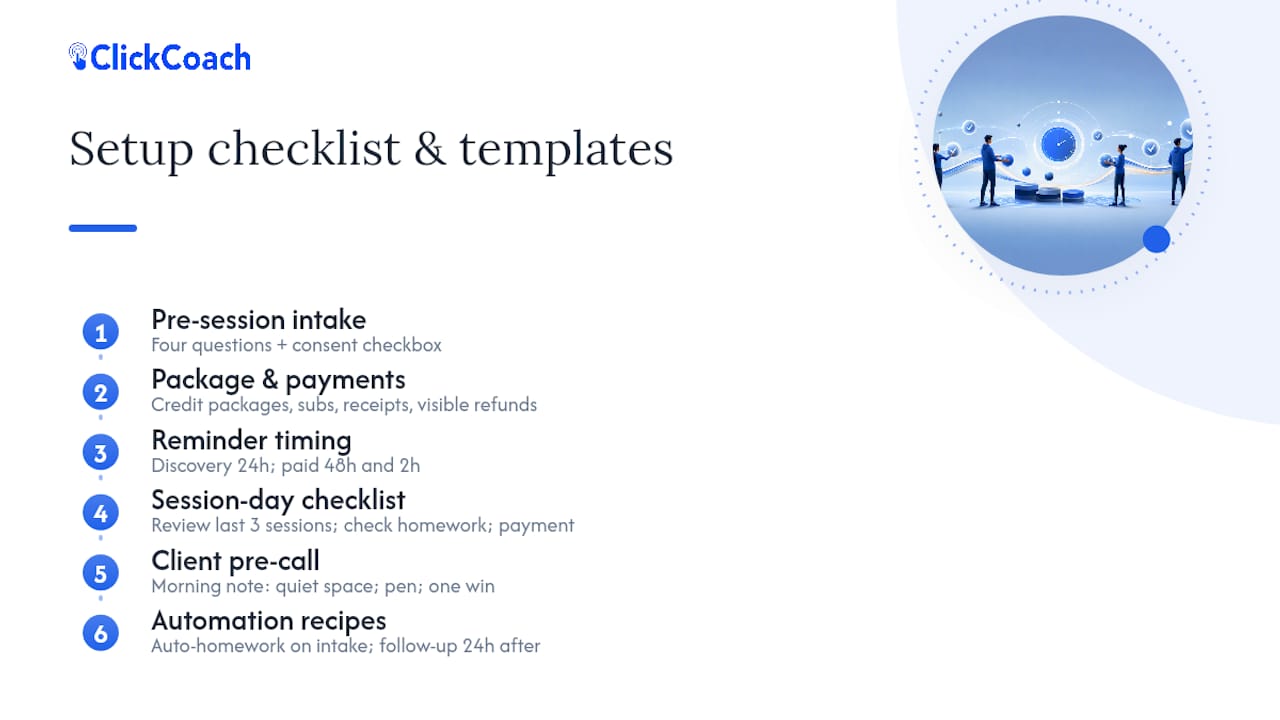
1. Pre-session intake template. Ask four questions, no more: “What’s the main goal for our work together right now?” “What’s gotten in the way of progress since our last session?” “Is there anything you’d rather I know before we start?” and a consent checkbox reading “I agree to my session notes being stored securely and used only to support my coaching.” Keep it to four fields; longer forms measurably lower completion rates.
2. Package and payment configuration checklist. Confirm the platform supports credit-based packages (buy 6 sessions, use them over 90 days), recurring monthly subscriptions, automatic receipt emails, and a written refund policy visible before checkout, not buried in terms of service.
3. Reminder timing templates. For a discovery call, send one reminder 24 hours out. For a paid session, send reminders at 48 hours and 2 hours, since money on the line raises the stakes of a missed slot. For a multi-session series, send a reminder before session one plus a short “what to bring” note before every session after that.
4. Session-day checklist. Five minutes before each call: review the client’s last three sessions, check outstanding homework status, confirm payment is current, and glance at the intake notes if it’s a first session.
5. Client pre-call checklist. Send this the morning of: “Find a quiet space, have something to write with, and think about one win from the past week.”
6. Automation recipes worth setting up on day one. Trigger a homework assignment automatically the moment an intake form is submitted. Trigger a follow-up email 24 hours after a session ends, asking the client to log progress on their action items. These two automations alone eliminate a meaningful share of manual post-session admin.
Pro Tip: Build your intake template inside whichever tool you trial first, then reuse the exact same wording across every platform you test. Changing the questions between trials makes it impossible to compare booking completion rates fairly.
Why ClickCoach Is Built for Scheduling Plus Practice Management
ClickCoach brings client records, session notes, goals, action plans, homework, progress tracking, billing, and branded client portals into one workspace, which directly answers the fragmentation problem described above. A booking doesn’t just reserve a calendar slot inside ClickCoach; it connects to the client’s full history, so a coach opens the session already knowing what was assigned and what progress looks like.
That structure solves the specific failure points a standalone scheduler creates. Intake data collected at booking flows into the same client record the coach references during the session, instead of sitting in a separate form tool. Billing and package tracking live next to the session history rather than in a disconnected invoicing app. For practices running group programs, cohort management and individual client tracking sit in the same system rather than two.
ClickCoach also includes AI assistance for drafting homework and follow-up actions after a session, with the coach reviewing and approving what gets sent rather than the software acting unsupervised. That’s a productivity assist, not a replacement for coaching judgment.
If you’re evaluating ClickCoach during a trial, start with one real booking type end to end: set up an intake form, book a session, confirm the reminder fires, and check that the session notes and homework assignment connect automatically to that client’s file. That single flow tells you more about fit than browsing the feature list.
A Candid Recommendation and the Mistakes Coaches Keep Making
Map your booking types before you switch anything. That one step prevents most of the pain I see coaches run into during a scheduler migration.
The most common mistake is migrating the calendar first and the client data second, which recreates the exact fragmentation you were trying to fix. A close second: skipping a real trial and choosing based on a demo call alone, then discovering in week three that package billing doesn’t work the way you assumed.
Before you commit, run this short checklist: export your current client list, test one full booking flow including payment, confirm reminders fire correctly, and check that historical notes can be imported. Skip any of those four and you’re migrating blind.
— Mitch Russo
Getting Started With ClickCoach
Everything covered here points to the same practical conclusion: scheduling that lives apart from your client records will always cost you time you can’t get back. ClickCoach exists specifically to close that gap for professional coaches, whether you run a solo practice or manage a team of coaches sharing client load.

Starting a trial is straightforward. Set up one booking type first, whether that’s a discovery call or a paid session, and walk it through end to end: intake form, calendar booking, payment if applicable, and the automatic connection to a client record. Check whether homework assigned after that first session shows up correctly in the client’s file, and see how the branded client portal looks from the client’s side of the booking. That single test tells you more in twenty minutes than a feature comparison chart ever will.
If the practice management side is what you came to evaluate first, the ClickCoach coaching business management platform page walks through how client records, billing, and scheduling connect in one workspace. Start there, run the trial, and judge it against the checklist you built while reading this guide.
Sources
- Coaching management software runs your whole practice in one place (category comparison)
- G2 — software reviews and ratings
FAQ
What Is the 70/30 Rule in Coaching?
The 70/30 rule generally refers to a coaching conversation guideline where the coach talks roughly 30% of the time and listens or asks questions the other 70%, keeping the focus on the client’s own thinking rather than the coach’s advice.
What Is the Best Training Scheduling Software?
The best choice depends on whether training sessions are one-off or tied to a broader program; if training includes assignments, progress tracking, or client records, an all-in-one platform like ClickCoach handles that connection better than a scheduler built only for booking slots.
What Is the Most Popular Scheduling Software?
Popularity varies widely by industry and use case, and general-purpose scheduling tools built for any business rarely include the client records, homework tracking, or package billing that coaching specifically requires.
What Is the Best Team Scheduling App for Coaches?
For a multi-coach practice, the best team scheduling setup supports round-robin assignment, permission controls so coaches only see their own client notes, and an admin rollup view across the whole team’s bookings, features that stand-alone calendar apps typically don’t offer.
How Do I Reduce No-Shows for Coaching Sessions?
Automated reminders sent at two intervals, such as 24 hours and 1 to 2 hours before a session, measurably reduce missed appointments compared to a single reminder or none at all.