

For most coaching practices, ActiveCampaign is the strongest overall pick because its automation and built-in CRM handle discovery calls, nurture sequences, and program follow-up in one place. Flodesk is the better call if you want polished, branded emails without touching a template editor. Brevo suits coaches who store a large list but only email part of it regularly, since it charges by send volume rather than contact count. The full comparison below explains why, and what to check before you commit.
TL;DR:
- Coaches with high-ticket funnels or webinar-driven sales should prioritize ActiveCampaign for its automation and CRM capabilities.
- Coaches seeking visually polished emails without complex automations can choose Flodesk, thanks to its flat pricing and user-friendly templates.
- Large, inactive lists are best served by Brevo, which charges based on emails sent rather than contacts stored, enabling cost-effective segmentation.
- For ongoing client management, an integrated platform like ClickCoach automates follow-ups based on session activity and reduces manual data handling.
- Building the right sequences for onboarding, follow-up, graduation, and check-ins depends on your practice’s sales model and automation needs.
Table of Contents
- What Is the Best Coaching Email Software?
- The Coach-Focused Shortlist: 6 Tools Worth Trialing
- Per-Tool Breakdown: Automation, Pricing, and Fit
- How We Evaluated These Tools for Coaches
- How to Choose Coaching Email Software That Fits Your Practice
- Four Email Sequences Every Coach Should Build First
- Standalone Email Tools vs. Integrated Coaching Platforms
- Where ClickCoach Fits Into Your Email Strategy
- Sources
- FAQ
What Is the Best Coaching Email Software?
The term “coaching email software” usually means something narrower than general email marketing tools. Coaches need automation that mirrors how coaching actually runs: discovery calls, program stages, session reminders, check-ins, and graduation. A newsletter tool built for online retailers checks none of those boxes well.
That’s the gap between generic email marketing platforms and what a coaching business actually needs. A retailer wants abandoned-cart emails. A coach wants a sequence that fires after someone books a discovery call, another that nudges a client who missed two check-ins, and a third that asks for a testimonial once a program wraps.
ActiveCampaign shows up constantly in coach-focused roundups for exactly this reason. It pairs deep automation with CRM features that track where a lead sits in your funnel, which matters when you’re running webinars, applications, or multi-step sales conversations instead of a simple buy button. But it isn’t the only right answer, and which tool wins depends heavily on how you sell and how technical you want your setup to be.
The Coach-Focused Shortlist: 6 Tools Worth Trialing
Ten tools show up in most coach comparisons. Six of them cover nearly every coaching business model, from webinar-driven sales to content-led audience building.
- ActiveCampaign — Best for coaches running high-ticket funnels, applications, or webinar sequences. Free trial available, paid plans scale with contacts; the CRM and automation depth are the draw, not the entry price.
- Flodesk — Best for coaches who want their emails to look like their brand without hiring a designer. Flat monthly pricing regardless of list size makes budgeting predictable as your list grows.
- Brevo — Best for coaches with a large stored list who only email a portion of it regularly, since pricing is based on emails sent rather than contacts stored. Some plans bundle SMS and WhatsApp.
- ConvertKit — Best for coaches who grow through content, podcasts, or digital product launches. Tagging and landing pages are built for creators, not sales teams.
- GetResponse — Best for coaches whose main acquisition channel is webinars, since webinar hosting sits inside the same platform as the email automation, keeping the funnel in one tool instead of three.
- AWeber — Best for coaches who want something simple and dependable without a steep learning curve. A visual automation builder covers straightforward nurture flows without overwhelming a first-time user.
Sequenzy, Kit, Sender, and Mailchimp round out the field and each earns a fuller look below, but the six above cover the majority of coaching business models you’ll encounter. If your practice runs mostly on one-on-one calls with a simple booking page, start with AWeber or Flodesk. If you’re selling a group program through webinars and applications, GetResponse or ActiveCancampaign fit that motion far better.
Per-Tool Breakdown: Automation, Pricing, and Fit
Here’s what each tool actually does, who it fits, and where it falls short for coaching work specifically.
Sequenzy builds AI-assisted email sequences from coach-specific templates, aiming squarely at follow-up automation between sessions.
- Fits coaches who want a starting draft rather than a blank editor, since an empty template is often the real barrier to sending anything at all.
- Automation centers on sequence generation rather than deep behavioral triggers.
- Pros: coach-specific templates, faster first draft. Cons: less mature ecosystem than the legacy platforms, so integration depth with calendars and payment processors is worth confirming before you commit a full year.
Flodesk charges one flat rate no matter how large your list gets, which changes the math for coaches actively growing an audience.
- Fits coaches who care more about visual polish than complex branching logic.
- Automation is straightforward: sequences and simple triggers, not advanced conditional logic.
- Pros: flat pricing, strong templates, easy learning curve. Cons: automation depth and native CRM features trail ActiveCampaign and GetResponse, and third-party integrations are lighter.
Brevo prices by volume sent, not contacts stored, which rewards coaches who segment carefully and email selectively rather than blasting the full list every week.
- Fits practices with a large historical list of past clients, webinar attendees, or downloads that they touch only occasionally.
- Automation includes workflow builders and, on some plans, SMS or WhatsApp alongside email.
- Pros: cost control for large but quiet lists, multichannel options. Cons: the interface leans more technical than Flodesk or AWeber, and coach-specific templates are thinner than on Sequenzy.
ActiveCancampaign combines automation with a genuine CRM, tracking deal stages, lead scoring, and pipeline status alongside the email itself.
- Fits coaches selling through applications, discovery calls, or multi-touch webinar funnels where a lead’s status matters as much as the message.
- Automation depth is the deepest on this list: conditional branching, site tracking, and CRM-triggered sends.
- Pros: automation and CRM in one subscription, strong integrations with calendar and payment tools. Cons: steeper learning curve, and the price climbs faster as your contact count grows.
ConvertKit was built for creators first, which shows up in its tagging system and its landing page builder.
- Fits coaches who publish content regularly and convert readers or listeners into clients or program buyers.
- Automation covers tagging-based sequences and simple visual automations rather than deep CRM logic.
- Pros: clean interface, strong for digital product and course launches. Cons: less suited to sales-call-heavy funnels, and CRM-style pipeline tracking is minimal.
GetResponse bundles webinar hosting directly into the platform, which matters if webinars are your main sales engine.
- Fits coaches who run live or automated webinars as their primary conversion event.
- Automation includes funnel templates built around webinar attendance and follow-up.
- Pros: webinar and funnel tools under one login, solid automation. Cons: the interface can feel busy for coaches who only need basic email sequences.
AWeber keeps things simple with a visual automation builder and dependable delivery.
- Fits beginner coaches or solo practitioners who want reliability over advanced features.
- Automation covers standard drip sequences and tag-based segmentation, nothing especially deep.
- Pros: easy setup, solid deliverability track record. Cons: fewer coach-specific templates, and advanced CRM-style tracking isn’t part of the platform.
Mailchimp remains familiar to almost everyone who has used any email tool before.
- Fits coaches who want a newsletter-first approach and only need basic automation.
- Automation exists but isn’t the platform’s strength compared to ActiveCampaign or GetResponse.
- Pros: wide familiarity, easy to find tutorials and integrations. Cons: pricing scales with contacts quickly, and coaching-specific templates are essentially nonexistent.
Kit markets itself around a generous free sending tier, aimed at coaches just getting started.
- Fits new coaches who need to build a list before committing to a paid platform.
- Automation on the free tier is limited; expect to outgrow it as your funnel gets more complex.
- Pros: low barrier to entry, no upfront cost. Cons: as a newer entrant, its integration ecosystem and coach-specific features are still thin compared to established platforms.
Sender targets the same budget-conscious coach as Kit, with a generous free plan and simple automation.
- Fits coaches testing their first sequences without spending anything yet.
- Automation covers basic drip flows, adequate for a first welcome series.
- Pros: free plan, simple interface. Cons: limited coach-specific templates and shallower integration options than the paid-first platforms.
How We Evaluated These Tools for Coaches
Every tool on this list was assessed against the criteria that matter most in a coaching workflow, not a generic e-commerce or SaaS newsletter use case.
- Automation depth: Can the platform trigger a sequence off a specific event, like a booked discovery call or a completed session, rather than just a calendar date?
- Ease of use: How long until a non-technical coach can build a working welcome sequence without help?
- Deliverability and technical setup: Does the platform walk users through SPF and DKIM authentication, and does it show clear deliverability metrics?
- Integrations: Does it connect cleanly to calendar tools, payment processors, and CRM systems coaches already use?
- Coach-specific features: Are there templates built for onboarding, check-ins, or program completion, or does every sequence start from a blank page?
- Price scalability: Does the cost structure punish a growing list, or does it stay predictable as the practice scales?
Pro Tip: Run the same test sequence in your two finalist tools before deciding. Building the same three-email welcome series in both reveals more about ease of use than any feature comparison chart.
This evaluation relied on vendor documentation, published pricing pages, and comparisons already circulating among coach-focused sources, cross-checked against how each platform’s automation and CRM features are described by other reviewers. It did not include enterprise-tier testing or multi-seat team accounts, so larger coaching firms with dedicated marketing staff should verify collaboration features directly with each vendor before signing an annual contract.
How to Choose Coaching Email Software That Fits Your Practice
Before you pick a tool, run through a short checklist that reflects how your coaching business actually operates, not just what looks good on a features page.
- List size and growth rate. A slow-growing solo practice under 500 contacts has very different pricing needs than a group-coaching business adding hundreds of leads a month.
- Sales model. Discovery-call-based selling wants CRM-style pipeline tracking; content-driven selling wants tagging and landing pages; webinar-based selling wants integrated hosting.
- Required automations. List every trigger you actually need: booking confirmation, missed-session follow-up, program-stage tagging, graduation and referral requests.
- Team access. If you run a multi-coach practice, check whether the plan supports multiple logins with different permission levels before you scale past yourself.
- Pricing triggers. Know exactly what causes your bill to increase: more contacts, more sends, more automations, or added team seats.
When you get on a trial call or demo, ask these six questions directly:
- What deliverability controls do you offer, and can I see authentication status for SPF and DKIM?
- Is there API or webhook access if I need to connect a booking or payment tool you don’t natively support?
- How does unsubscribe handling work across multiple lists or tags?
- Can I trigger a sequence from a calendar booking rather than a manual list add?
- Can this platform send session reminders by email, and does it support SMS if I need it later?
- What happens to my automations and data if I downgrade or cancel?
Red flags to watch for: A platform that can’t show clear authentication settings for outbound domains is a deliverability risk. Fix it by choosing a tool with a documented SPF/DKIM setup wizard rather than a support ticket queue. A pricing page that hides automation limits behind a “contact sales” wall is another warning sign. Ask for the limit in writing before you commit a card.
Two quick archetypes: a solo life coach running mostly one-on-one calls with under 300 contacts fits well with AWeber or Flodesk, where simplicity and predictable cost matter more than CRM depth. A business coach running a webinar funnel into a group program, with a list past a thousand contacts and multiple offers, is better served by ActiveCancampaign or GetResponse, where automation branching and pipeline visibility earn their higher price.
Four Email Sequences Every Coach Should Build First
Lifecycle automations, especially welcome and onboarding series, consistently outperform one-off promotional emails on open rates and revenue per email. These four sequences cover the moments that matter most in a coaching relationship.
- Welcome and onboarding series (3 to 4 emails). Trigger it off a new client signing up or completing intake paperwork. Goal: set expectations, share how to book the first session, and introduce how progress gets tracked.
- Discovery call follow-up. Trigger it the moment a call gets booked, with one email confirming details and a short qualification question, then a second email after the call with next steps and a clear path to enroll.
- Program completion and graduation. Trigger it off a program’s final session or a completion date field. Goal: request a testimonial, offer a referral incentive, and open the door to a next-level offer.
- Weekly check-in and accountability. Trigger it on a recurring schedule tied to program stage, not a fixed calendar date, so a client in week two gets a different nudge than one in week ten.
Segment each sequence by program type and stage rather than treating your whole list as one audience. A discovery-call sequence for a $200 single session should read very differently than one for a $5,000 six-month engagement, even if the trigger event is identical.
Standalone Email Tools vs. Integrated Coaching Platforms
Here’s where I land after looking at all ten tools side by side: a standalone email platform is the right call when your business is content-first and your email list is your main asset, the way it is for a creator selling a course through ConvertKit or GetResponse.
But most coaching businesses aren’t content businesses. They’re relationship businesses where email is one thread in a bigger operational fabric that includes session notes, progress tracking, and billing. When those systems live apart, you end up manually copying client status between your CRM, your notes app, and your email tool, and that’s where sequences go stale.
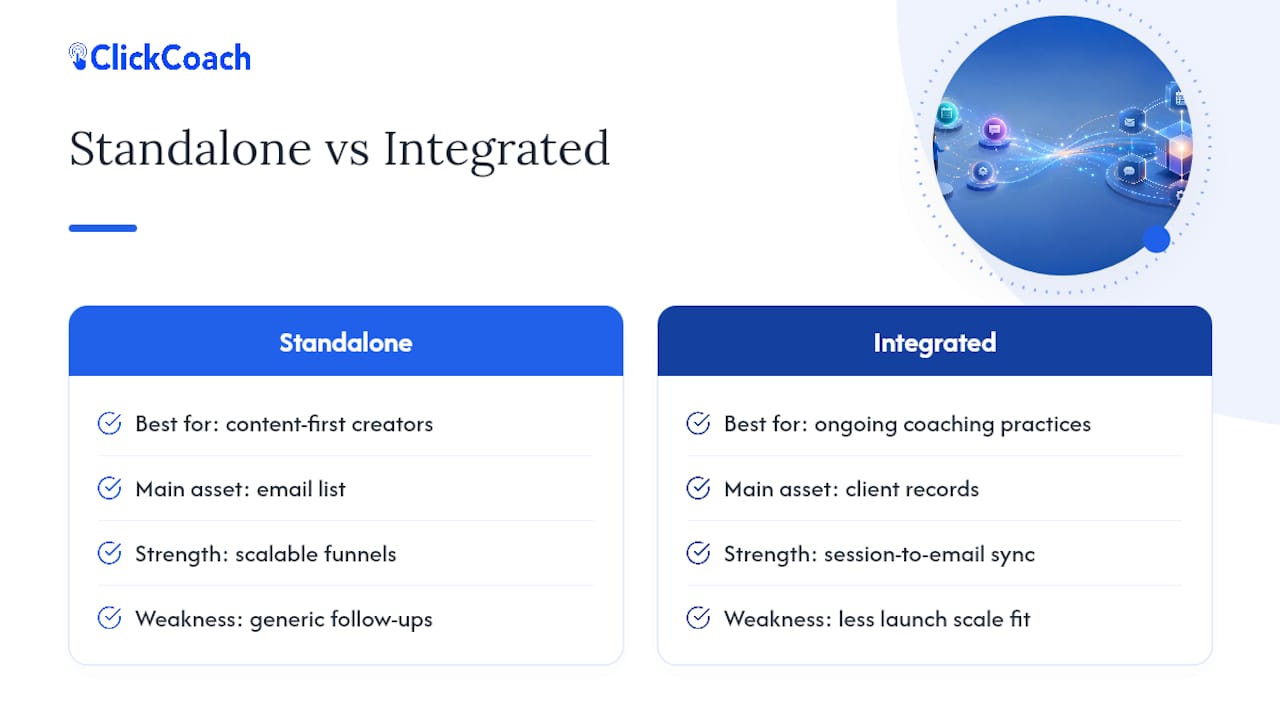
The clearest case for integration is a simple one: a client completes a session, the coach logs a note, and that note change should be able to trigger a follow-up email with the client’s actual homework, not a generic template. When email and client records share a workspace, that handoff happens automatically instead of depending on the coach remembering to do it manually that evening.
Standalone tools still win when your funnel is built for scale before service, like a course launch to thousands of cold subscribers. For a coaching practice built on ongoing sessions and accountability, the operational case for keeping email connected to client records gets stronger every month your roster grows.
— Mitch Russo
Where ClickCoach Fits Into Your Email Strategy
If you’re running a coaching practice rather than a content business, the sequences covered above (welcome, discovery-call follow-up, graduation, and check-ins) work best when they’re triggered by what’s actually happening in your sessions, not a separate list you maintain by hand. ClickCoach handles this by keeping branded email broadcasts, follow-up automation, and AI-assisted homework drafts inside the same workspace as your client records and session notes, so a completed session can trigger the next step without you copying anything between apps.

This approach fits coaches who are tired of maintaining client status in three different tools and want session data to drive their follow-up automatically. If your business is closer to a content funnel selling a course to a cold audience, a standalone tool from this list may still serve you better. But if you’re running ongoing client relationships and want your coaching business management software to handle the email side too, start a trial and see whether an integrated workflow actually reduces your weekly admin load.
Sources
- Best Email Marketing Tools for Coaching Businesses | Email Tool Spot
- Email Marketing Benchmarks by Industry 2026: 32M sends across 38 sectors
- Yoursolopreneurkit
- B2bdaily
FAQ
What Is the Best Coaching Software Overall?
For email specifically, ActiveCampaign leads for most coaching businesses because of its automation depth and built-in CRM. For coaches who want email integrated with session notes, billing, and client progress tracking in one workspace, a platform like ClickCoach covers more of the practice than an email tool alone.
What Is the 70/30 Rule in Coaching?
Definitions of this rule vary by coach and program, so there’s no single agreed-upon standard to cite here. If you’ve heard it referenced in a specific certification or methodology, check that source directly rather than relying on a general definition.
Is There a Better Option Than Mailchimp for Coaches?
Yes, several. ActiveCampaign offers deeper automation and CRM tracking, Flodesk offers flat-fee pricing that doesn’t climb with your list, and Brevo charges by emails sent rather than contacts stored, which suits coaches with large but selectively-emailed lists.
Can ChatGPT Be My Life Coach?
ChatGPT can offer general reflection prompts and suggestions, but it isn’t a licensed coach, has no memory of your ongoing progress unless manually provided, and can’t track accountability over time the way a human coach or a dedicated practice management system can. Treat it as a brainstorming tool, not a replacement for structured coaching.
How Do I Choose Between Standalone Email Software and an Integrated Platform?
Choose standalone email software if your business runs primarily on content and cold-audience funnels. Choose an integrated platform if your coaching practice depends on session notes, client progress, and billing feeding directly into your follow-up communication.