

ClickCoach is the recommended CRM for professional coaches who want an all-in-one practice management system that combines client records, session notes, progress tracking, billing, and a branded client portal. If you run a booking-first solo practice, Paperbell is a reasonable narrow fit, and if your work looks more like a consulting sales pipeline, Pipedrive or Nutshell can serve that specific job. Check the comparison table below, or skip ahead to see how ClickCoach handles the full coaching workflow.
TL;DR:
- ClickCoach offers a unified platform designed specifically for coaching workflows, including session notes, progress tracking, billing, and client portals.
- Coaches prioritizing client progress over sales pipelines should ensure their chosen CRM supports structured session and goal management, not just lead automation.
- Setting up a coaching CRM typically takes one to two days for solo practices and one to two weeks for small teams migrating existing data.
- Key features to test before committing include client records, automated session reminders, progress reports, portal access, and seamless calendar and payment integrations.
- For coaching practices that focus on course delivery or high-volume sales, alternative tools like Kajabi or Pipedrive may better serve their specific operational needs.
Table of Contents
- Which Coaching CRM Fits Your Profile?
- How Do the Top Coaching CRMs Compare?
- Which CRM Fits Which Kind of Coach?
- How We Evaluated These CRMs
- What Should You Look for in a Coaching CRM?
- Why Coaches Need a CRM in the First Place
- Final Recommendation and Next Steps
- How Long Does It Take to Set Up a Coaching CRM?
- What Does a Coaching CRM Actually Cost Over Time?
- What Actually Limits a Coaching Practice From Scaling
- Get Started With ClickCoach
- Sources
- FAQ
Which Coaching CRM Fits Your Profile?
Matching a CRM to how you actually work saves you from months of trial and error. Here’s a fast way to sort the sixteen tools in this guide by who you are and what you need most.
- Solo coach running 1:1 or group programs who wants one system for everything: ClickCoach. Setup typically takes a few hours to a few days, and pricing runs as a single subscription covering the full platform rather than stacked add-ons.
- Booking-first solo practitioner who mainly needs scheduling and payment collection: Paperbell. It bundles intake, contracts, and payments into one flow, which shortens onboarding for coaches who don’t need deep progress-tracking tools.
- Consultant-style coach managing a high-volume sales pipeline: Pipedrive or Nutshell. Both emphasize visual pipeline stages over coaching-specific features like homework or client portals.
- Coach whose revenue centers on courses or memberships: Kajabi, since it treats content delivery as the primary product rather than 1:1 session management.
- Multi-coach firm needing role-based dashboards and reporting depth: ClickCoach or HubSpot CRM, depending on whether you want coaching-specific workflows or a broader marketing/sales stack.
For most professional coaches, especially those managing individual client relationships with real accountability between sessions, the decision point is simple: do you need a system built around coaching sessions, or a generic sales tool you’ll have to adapt? That distinction drives most of the profiles below.
How Do the Top Coaching CRMs Compare?
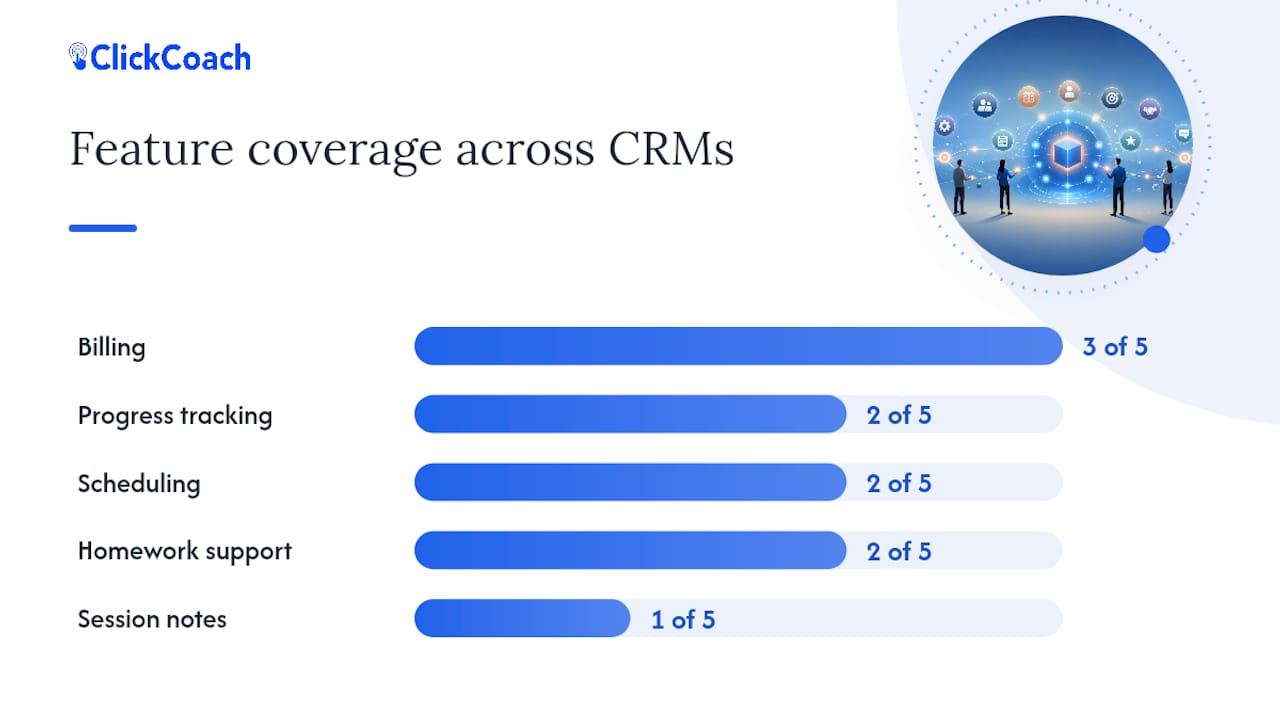
Reading the table below requires knowing two things. Pricing shape describes the billing structure, not the exact dollar amount: some tools charge per seat, which gets expensive fast for growing teams, while coaching-specific platforms tend to favor flat subscriptions that suit solo and small practices better, according to an analysis of CRM requirements for business coaches. Ease of use reflects how much setup and configuration a coach needs before the tool actually helps, not a subjective polish score.
The coaching industry itself gives this comparison weight. The 2025 ICF Global Coaching Study counted 122,974 coach practitioners worldwide and $5.34 billion in annual revenue, a record for the profession. More practitioners competing for client attention means the operational side of your business, not just your coaching skill, increasingly decides who scales and who stalls.
| CRM | Best For | Standout Feature | Pricing Shape | Key Coaching Features |
|---|---|---|---|---|
| ClickCoach | Solo coaches and small multi-coach practices wanting one integrated system | Built specifically for coaching workflows: progress tracking, AI-assisted homework, branded portal | Flat annual subscription, full platform access | Session notes, client portal, billing, CRM pipeline, group coaching tools |
| Paperbell | Solo coaches who want fast setup with booking and payments combined | Integrated booking, contracts, and payment flow | Flat subscription | Scheduling, payments, simple client intake |
| CoachAccountable | Coaches needing structured program delivery and accountability | Deep progress-tracking and homework assignment tools | Flat subscription, tiered by client count | Program templates, homework tracking, client accountability |
| Delenta | Coaches running packaged programs who want billing bundled in | Program-focused client management | Flat subscription | Client management, payments, program delivery |
| CoachVantage | Coaches needing scheduling tightly linked to client engagement | Scheduling and engagement integrations | Flat subscription | Client engagement tracking, scheduling |
| Simply.Coach | Coaching businesses wanting structured session and goal tracking | Session and goal management built for coaching engagements | Flat subscription | Goal tracking, session scheduling, client management |
| Quenza | Coaches and practitioners who want digital exercise and homework tools | Interactive homework and activity builder | Flat subscription | Homework assignment, client activities |
| Nutshell | Coaches running consulting-style sales pipelines | Clean, visual pipeline management | Per-user seat pricing | Pipeline stages, sales reporting |
| Pipedrive | Coaches treating client acquisition as a volume sales pipeline | Visual pipeline with activity-based reminders | Per-user seat pricing | Deal pipeline, automated activity reminders |
| Salesflare | Coaches wanting automated data entry in a sales-focused CRM | Automated contact and email tracking | Per-user seat pricing | Pipeline automation, email tracking |
| OnePageCRM | Coaches who want a simple, action-focused sales tracker | Next-action based task system | Per-user seat pricing | Action lists, contact tracking |
| HubSpot CRM | Coaches expecting to need enterprise reporting later | Free core tier with mature integrations ecosystem | Free core, paid tiers for automation | Contact management, basic pipeline, marketing add-ons |
| GoHighLevel | Coaches prioritizing marketing funnels and automation | Strong funnel builder and marketing automation | Flat subscription, agency-oriented tiers | Funnels, automation workflows, basic CRM |
| Kajabi | Coaches selling courses, memberships, or digital programs | Integrated course delivery and member management | Flat subscription, tiered by features | Course hosting, membership management, email marketing |
| HoneyBook | Creative and life coaches wanting contracts and invoicing bundled | Client-facing contracts and payment workflows | Flat subscription | Proposals, contracts, invoicing |
| Fluid CRM | Small consulting teams needing seat-based team management | Team-focused features at accessible price points | Per-seat pricing | Team pipelines, task assignment |
HubSpot’s own product documentation confirms the free core tier, but also notes that meaningful automation lives behind paid add-ons, worth knowing before you build a workflow you can’t afford to keep.
Which CRM Fits Which Kind of Coach?
ClickCoach: the integrated system built for coaching, not adapted to it
ClickCoach is designed around what a coaching session actually produces: notes, goals, homework, and evidence of progress a client can see. That’s a different starting point than a sales CRM retrofitted with a “client” field. For a professional coach managing an active caseload, that difference shows up every week, not just at signup.
The standout features worth testing in a trial:
- Session notes tied directly to each client record, so history stays intact even as engagements renew.
- A branded client portal where clients see their own goals, homework, and progress between sessions.
- AI-assisted homework and follow-up drafting, with the coach reviewing and finalizing before anything goes out.
- Billing and subscription management built into the same workspace as client records, so payment status and session history live together.
- Multi-coach team administration for practices adding associate coaches without duplicating tools.
ClickCoach fits best for solo coaches who’ve outgrown spreadsheets and generic scheduling apps, and for small multi-coach practices that need consistent standards across every coach on the team. It’s a weaker fit if your business model is primarily course sales with minimal 1:1 session work, where a platform like Kajabi does more of that specific job.
Pro Tip: During any CRM trial, create one full client record from scratch, including a goal, a homework assignment, and a mock invoice. If that takes more than fifteen minutes, the tool wasn’t built with coaching workflows in mind.
Paperbell: booking and payments without the extra layers
Paperbell keeps things narrow on purpose. It handles scheduling, contracts, and payment collection in a single flow, which works well for a coach who mainly needs new clients to book and pay without friction. It doesn’t offer the progress-tracking or homework infrastructure that programs built around measurable client transformation tend to need. Pick it if your practice is booking-heavy and light on structured curriculum; look elsewhere if demonstrating client progress over time matters to your business model.
CoachAccountable: deep on program delivery
CoachAccountable leans hard into structured coaching programs; homework assignments, habit tracking, and client accountability are its core strength. Coaches running multi-week or multi-month programs with defined milestones tend to like the granularity. The tradeoff is a less polished client-facing experience compared to newer platforms, and a steeper learning curve during setup.
Delenta and CoachVantage: program and engagement specialists
Delenta bundles client management with billing for coaches who sell packaged programs rather than open-ended hourly work. CoachVantage focuses on scheduling tightly integrated with client engagement tracking, useful if keeping session cadence visible matters more to you than deep progress analytics. Both serve narrower use cases than a full practice-management platform, and coaches often outgrow them as their client base and reporting needs grow.
Simply.Coach and Quenza: session and homework tools
Simply.Coach centers on structured goal tracking paired with session scheduling, a reasonable fit for coaches who want a coaching-specific tool without full billing infrastructure. Quenza specializes in interactive homework and exercise delivery. Both work as one piece of a larger stack rather than a complete practice-management replacement.
Nutshell, Pipedrive, Salesflare, and OnePageCRM: sales-pipeline tools adapted for coaching
These four share a lineage in traditional sales CRM design. Nutshell offers clean pipeline visibility that suits a coach who thinks in terms of leads, proposals, and closed deals rather than session cadence. Pipedrive brings the same pipeline logic with strong activity reminders, useful for consultants running high lead volume. Salesflare automates contact and email tracking, cutting manual data entry for coaches who hate typing notes about who they talked to. OnePageCRM strips things down to a single next-action list, appealing if you want simplicity over feature depth.
None of the four include coaching-specific features like session notes tied to client goals, homework assignment, or a branded client portal. They’re strong at pipeline management and weak at demonstrating client progress, which matters if retention and referrals depend on clients seeing their own growth.
HubSpot CRM and GoHighLevel: broader marketing platforms
HubSpot’s free tier makes it tempting as a starting point, and its integration ecosystem is genuinely mature. But coaching-specific functionality (session notes, progress tracking, client portals) isn’t part of the core product; you’re building coaching workflows on top of a general CRM. GoHighLevel leans further into marketing automation and funnel-building, a better fit for coaches whose growth strategy centers on paid lead generation than for those focused on delivery quality for existing clients.
Kajabi and HoneyBook: adjacent business models
Kajabi solves a different problem: hosting and selling courses or memberships at scale. If your coaching business is really a content business with occasional 1:1 add-ons, it’s worth considering, but it isn’t built for tracking individual client progress across live sessions. HoneyBook serves creative professionals and coaches who need contracts and invoicing bundled together, without coaching-specific session or progress features layered in.
Fluid CRM: seat-based team pricing
Fluid CRM targets small consulting and service teams that need straightforward, seat-based user management. It’s a reasonable option for a coaching firm structured more like a traditional consultancy, though it lacks the coaching-specific workflow features that platforms built exclusively for coaches provide.
How We Evaluated These CRMs
Every tool in this guide was assessed against the same seven axes, weighted toward what actually affects a coaching practice day to day rather than generic CRM feature checklists.
- Coaching workflow support: does the tool understand sessions, goals, and homework, or treat clients like generic sales contacts?
- Lead intake and follow-up automation: can you automate outreach at coaching-specific milestones, like post-discovery-call or after a lapsed session?
- Session and progress tracking: is there a structured way to log sessions and show client progress over time?
- Billing and contracts: does invoicing live inside the platform or require a separate tool?
- Client portal: can clients see their own goals, homework, and progress without emailing you for updates?
- Integrations: does the tool connect to calendar, video conferencing, and payment systems coaches already use?
- Price and scale: does the pricing model make sense for a solo practice, and does it scale sanely if you add associate coaches?
This evaluation drew on vendor product documentation, publicly available demos, and independent industry commentary rather than vendor marketing claims alone. Pricing and feature sets in this space change often, so treat the comparison table as directionally accurate and verify current details on each vendor’s own pricing page before committing.
What Should You Look for in a Coaching CRM?
Start with lead intake and follow-up automation. Follow-up tied to specific coaching milestones, like a message after a discovery call or a check-in after a lapsed session, keeps warm prospects from going cold, and it’s one of the most commonly cited requirements coaches list when evaluating CRM options. From there, prioritize in this order:
- Session notes tied to client records, not a generic notes field disconnected from history.
- Progress tracking that shows a client’s trajectory over weeks or months, not just a single snapshot.
- Billing and contracts built into the same system, so payment status doesn’t live in a separate spreadsheet.
- Client portal access, letting clients see their own goals and homework without a separate login system.
- Reporting depth, especially if you run a multi-coach practice and need visibility across coaches.
- Core integrations: calendar sync, a video conferencing tool, and payment processing are close to non-negotiable.
- Pricing that scales sanely, whether flat-subscription or seat-based, matched to how you expect to grow.
Before you commit, run a real trial and test these specific actions:
- Can you create a full client action plan from scratch in under fifteen minutes?
- Does the platform automate session reminders without manual setup each time?
- Can you export a client’s progress report as a shareable document?
- Does the client portal work on mobile without a clunky login flow?
- Can you issue an invoice and track payment status inside the same tool?
- Does the calendar sync catch double-bookings automatically?
- Can a second coach be added with different permission levels?
- Is homework assignment and completion tracking visible to both coach and client?
Pro Tip: If a demo can’t show you a real client action plan, automated session reminders, and an exportable progress report within the first ten minutes, that’s a red flag worth taking seriously, not a setup quirk you’ll fix later.
Minimum integrations to require: calendar sync (Google or Outlook), a payment processor, and video conferencing like Zoom. A CRM missing any of these three will cost you more time patching gaps than it saves you in the platform itself.
Why Coaches Need a CRM in the First Place
A CRM isn’t overhead. It’s what stops warm leads from going cold and stops client progress from living only in your memory. Coaches without a system to track follow-up tend to lose prospects between the discovery call and the first paid session, exactly the gap automated milestone-based follow-up is built to close.
Progress tracking and homework automation do something else that matters just as much: they give clients tangible proof they’re moving forward, which drives renewals and referrals. A client who can see their own goal history and completed homework in a portal has a harder time forgetting why they hired you.
The scale of the opportunity backs this up. IBISWorld estimates the U.S. business coaching industry at $20.0 billion in 2026, with steady growth projected through the period. More coaches are competing for the same client base, and the ones with tighter delivery systems, not just better marketing, tend to retain clients longer.
Final Recommendation and Next Steps
ClickCoach remains the strongest all-in-one pick for professional coaches who want session notes, progress tracking, billing, and a client portal working together instead of stitched across four tools. If your model is booking-heavy with light program structure, Paperbell is worth a look; if you’re running a high-volume sales pipeline, Pipedrive or Nutshell fit that narrower job.
In your first week with any CRM, test: client record creation, a session note entry, a homework assignment, portal access from a test client account, one automated reminder, one invoice, and one progress export. A solo coach can typically be fully onboarded within a few days. A small team adding role-based permissions and migrating existing client data should plan for one to two weeks to get every coach comfortable in the new system.
How Long Does It Take to Set Up a Coaching CRM?
Setup time depends almost entirely on how much client history you’re migrating and how many coaches need onboarding, not on the software itself. A solo coach starting fresh, with no legacy client database to import, can typically be running real sessions inside a platform like ClickCoach within a day or two: creating client records, setting up a session note template, and connecting a calendar rarely takes longer than an afternoon.
The timeline stretches when you’re migrating existing clients from spreadsheets or another tool. Expect a few extra days to clean up contact data and re-create active client goals and homework history so nothing gets lost in the switch. For a small multi-coach practice, budget one to two weeks total: a few days for the primary admin to configure templates and billing, then a few more for each associate coach to get comfortable with session notes and the client portal.
The biggest time sink isn’t technical setup, it’s decision fatigue around templates. Coaches who arrive with a rough idea of their standard session structure and a defined homework format move through setup much faster than those trying to design their entire methodology at the same time they’re learning new software. Sort out your session template on paper first, then build it into whatever CRM you choose.
What Does a Coaching CRM Actually Cost Over Time?
The subscription price on a vendor’s homepage is rarely the full cost. Three other line items matter more than most coaches expect going in.
Onboarding time counts as a cost even when it’s not a line item. A coach who spends eight hours migrating client data and building templates has spent real money, whether or not the platform charges an onboarding fee.
Training time scales with team size. A solo coach only has to train themselves; a multi-coach practice needs every associate comfortable with session notes, the client portal, and billing workflows before the switch pays off. Plan for a short training session per coach rather than assuming the interface is self-explanatory.
Add-ons and upgrades are where seat-based tools like Pipedrive, Nutshell, Salesflare, and Fluid CRM can surprise you: the per-seat price looks reasonable for one user, then multiplies as you add associate coaches. HubSpot’s free core tier is genuinely free, but meaningful automation sits behind paid tiers, so budget for that upgrade if you expect to need it within the year.
Flat-subscription, full-access platforms avoid the upgrade-creep problem by pricing the whole platform at once rather than gating features behind higher tiers. When comparing total cost, price out year two, not just the signup price, especially if you’re planning to add coaches.
What Actually Limits a Coaching Practice From Scaling
Most coaches assume marketing is what caps their growth. It usually isn’t. The real ceiling is operational: when delivery quality depends entirely on what’s in the founder’s head, growth stalls the moment a second coach joins or client volume outpaces memory. Coaching organizations hit this wall constantly, and it has nothing to do with lead generation.

The fix is almost always duller than founders expect. Document your session structure once. Standardize how homework gets assigned. Automate the follow-up message that goes out after every discovery call instead of relying on memory. None of that requires new marketing spend, it requires a system that holds the standard so it doesn’t live only in your head.
I’ve seen this pattern play out the same way across the coaching delivery formats that scale well: the coaches who grow past a one-person operation are rarely the best marketers in the room. They’re the ones who turned their own judgment into a repeatable process before they tried to hand any of it off. A CRM built around coaching workflows, rather than adapted from generic sales software, is what makes that documentation stick instead of drifting back into informal habit within a month.
— Mitch Russo
Get Started With ClickCoach
ClickCoach gives you one system where session notes, client progress, homework, billing, and a branded client portal all live together, instead of scattered across a scheduling app, a spreadsheet, and an invoicing tool. It’s built specifically for the coaching workflow: log a session, assign homework with AI-assisted drafting you review before sending, track progress against goals, and bill clients without switching tabs.

Solo coaches ready to consolidate their tools, and small practices bringing on their first associate coaches, tend to benefit most, since the multi-coach team administration keeps standards consistent across every coach without extra setup work each time. If you want to see whether your own session structure fits cleanly into the platform, check current pricing and plan details and start a trial backed by a 30-day money-back guarantee.
Sources
- IBISWorld — Business Coaching industry in the United States
- Why coaching organizations stop scaling — Mitch Russo
FAQ
What Is the Best CRM for Professional Coaches?
ClickCoach is the strongest all-in-one option for most professional coaches because it combines session notes, progress tracking, billing, and a branded client portal in one platform built specifically for coaching workflows rather than adapted from generic sales software.
What Are the Top CRMs Coaches Should Consider?
Beyond ClickCoach, the most commonly recommended options include Paperbell for booking-first solo practices, CoachAccountable for structured program delivery, Pipedrive and Nutshell for pipeline-heavy consulting work, and HubSpot CRM for coaches who expect to need enterprise-level reporting later.
Will AI Replace CRMs for Coaches?
No. AI is increasingly built into CRMs to draft homework and follow-up messages, but a coach still needs a structured system to store client records, track progress, and manage billing, functions AI alone doesn’t replace.
Can ChatGPT Act as a Life Coach?
General AI chat tools can offer conversation and suggestions, but they don’t track client history, manage session records, or maintain the accountability structure a dedicated coaching relationship and a practice management system provide.
Is There a Single Best CRM for Every Business?
No single CRM wins for every business type. The right choice depends on your workflow: coaching-specific platforms like ClickCoach fit client-based practices best, while pipeline-focused tools like Pipedrive or Salesflare suit high-volume sales operations better.